 | VS. |  |
Showing posts with label Stories. Show all posts
Showing posts with label Stories. Show all posts
Tech Book Face Off: Breaking Windows Vs. Showstopper!
For this Tech Book Face Off, I felt like expanding my horizons a bit. Instead of reading about programming languages or software development or computer science and engineering, I thought I would take a look at some computer history from the business perspective. There are plenty of reading options out there in this space, but I settled on a couple of books about Microsoft. The first, Breaking Windows: How Bill Gates Fumbled the Future of Microsoft by David Bank, is about Bill Gate's hardball business tactics that won him a monopoly in the PC desktop market, but then nearly destroyed the company in that fateful confrontation with the US Justice Department and caused him to miss the Internet and, later, the mobile revolution. The second, Showstopper! The Breakneck Race to Create Windows NT and the Next Generation at Microsoft by G. Pascal Zachary, has an even longer subtitle that neatly describes the book on its own. Both of these books were written quite a while ago, so let's see how their stories hold up today.
Things Remembered and Things Left Unsaid
Many attempts to communicate are nullified by saying too much.I've been writing this blog now for three years straight. Once a week I sit down and write about a topic that interests me, and I haven't missed a single week since I started. Sometimes that is an extremely hard schedule to meet. Through it all I've learned and remembered a few things about writing, I've struggled through several especially challenging posts, and I've appreciated everyone who's taken the time to read what I've had to say. I hope it's been insightful.
-Robert Greenleaf
Something I've learned from all of this writing (besides the fact that it's hard and doesn't seem to get easier because I'm constantly pushing at the edge of my skill level) is that it's nearly as important to think about what to leave out as it is to think about what to include. The obvious reasons to leave things out are that those ideas aren't especially relevant to the topic at hand, or because it's impossible to address all issues related to a topic without writing an epic post. These all-inclusive posts would never end, so it's necessary to have focus in writing.
Another reason to leave things out of a post is a bit more subtle. I remember as a kid getting extremely frustrated with characters in movies or novels that seemed to be incapable of saying what needed to be said to resolve whatever conflict was going on. Parents not saying what they needed to their kids, kids not talking to their parents, friends letting misunderstandings get out of hand—why couldn't they all say what they were thinking? Part of this behavior was intentional plot devices, and part of it was normal poor communication. I get that. However, part of it also stems from communication being more complicated than simply laying it all out and having the other person listen to cold, hard reason. People want and need to come to conclusions on their own.
Writing this blog isn't exactly like relationships in a novel, of course. We're not in a major conflict that we're trying to resolve, but the desire to reach our own conclusions is the same. The best writings I've read aren't good so much because everything was explained in plain, indisputable language, but because it sparked ideas in my own mind and allowed me to fill in the gaps with compelling thoughts. It's much more engaging to read something that makes you think, and allows you to take ideas and expand on them. I find that it's a hard thing to do when writing, to say enough to paint a clear picture of the topic, but not create so much detail that the picture gets muddled and confused. It's a delicate balance.
Another aspect of writing that I'm continually aware of, and that I learned in high school is how hard but important it is to avoid Hefty Bag Words. This is an idea that has stuck with me ever since my Research and Comp class in 10th grade. I had an amazing teacher, Mrs. Hoffman, and I remember much of what she taught in that class, but nothing so much as Hefty Bag Words. The idea was that these words are used so often that they have basically lost all meaning, and should be bagged up and thrown in the trash. We were not allowed to use these words in our papers ever. Every time you used a Hefty Bag Word, you were immediately docked some number of points (5 points, if memory serves). It didn't matter one whit if the word fit well or not. If you needed to rephrase the sentence or restructure an entire paragraph to get rid of it, then that's what you had to do. Here are the ten Hefty Bag Words:
- there
- really
- very
- many
- things/stuff
- society
- which
- just
- interesting
- some
These are hard words to remove from your writing. I'm already guilty of using 'things' twice in the title and three times in the body of this post, not counting the times I was referring to the word itself. (It's a good thing Mrs. Hoffman isn't grading this post.) Even though I do use all of those words periodically in my writing, in the end I don't think it's entirely bad. The point is not to completely eliminate these and other mostly meaningless words from your writing, but to make the use of them count. Be as explicit as you can in your writing, and recognize when you're falling back on a vague filler word because it's easy.
So I've learned a lot over the past three years of blogging, and I've practiced writing more than at any other point in my life. It has been a worthwhile experience, and now I'm at somewhat of a transition point. Whereas at the end of the past two years of writing I found myself with more ideas for topics than I had before, this year I find my list winding down. I have a few more ideas that I can write about now, but only a handful. In addition, I have more ideas that I'd like to write about, but I haven't had the time to learn enough about them to feel competent enough to write about them. I'm also finding that I need more time to work on other projects.
Working on other projects and having extra time to read more will give me more to write about, but I have to have the time to experiment and learn first. That means I'm planning on tapering off my writing schedule a bit. Instead of writing a 2,000 word post every week, I'll shoot for once or twice per month and try to trim down the length as well. That will give me more time to learn new, um, stuff, and keep this blog somewhat, er, well, interesting. Happy Holidays, and watch out for those Hefty Bag Words.
What Once Was Hard, Is Now Easy
Think back to something that you learned that was really hard, harder than most things you were learning at the same time. Maybe it was a difficult mathematical or computer science concept. Maybe it was a complicated procedure for managing resources in a program. Maybe it was an intricate set of architectural principles for designing software. Is it still hard now, or is it easy?
If the difficult concept is now something you use all the time, it's almost certainly much easier to understand than it used to be. You're familiar with how to use it and what to watch out for while using it. But even if you haven't used the concept since you learned it, it may now be much easier to pick up and use than you expect.
I've had multiple experiences where I learned something difficult, especially in a college course, and then set it aside for a while before revisiting it because I needed it for some project. To my surprise, I found that I understood the concept much better than I thought I would, and I could use it effectively without days of study to relearn it.
One case I remember in particular was the Digital Design Fundamentals course I took in college. I took it during my Freshman year, and I distinctly remember thinking during the course that I was not understanding the material as well as I should have. Everything was new to me—binary and hexadecimal number systems, Karnaugh maps (extremely useful for boolean logic, by the way), Moore and Mealy state machines, and combinational logic design—and it felt like it was going over my head. I got a decent grade, but I finished the course thinking that I might need to study this stuff a bit more before it truly sunk in.
A couple years later I picked up the textbook again to brush up on my digital fundamentals for a more advanced course, and lo and behold, I found the entire book to be super easy. I had been using most of the concepts all along in other courses without knowing it because they were, well, fundamental, so I already had a solid working knowledge of them with no need to revisit the textbook.
Other things that stick out as being really difficult when I first learned them but much easier now are pointers, recursion, and interrupts. (There are also things that will always be hard, especially the big two: naming, caching, and off-by-one errors.) Pointers and recursion are fundamental concepts that, once you understand them, will make you a much better programmer than you were before. You won't just be better; you'll be a different kind of programmer altogether, able to solve whole classes of problems much more easily and elegantly than you could before. Interrupts are also a fundamental concept, although not as useful for all types of programming. They are most applicable to embedded and system programming.
At first glance, pointers don't seem that complicated—a pointer is simply a variable that contains a memory address that refers to another variable—but to someone who has never seen or used them before, they can be mind-bending. For some reason adding a level of indirection to a variable confuses everything. Things get even more confusing when passing pointers as arguments to functions, using function pointers, and figuring out pointers to pointers. At some point, everything clicks, and you go from completely not understanding pointers to wondering why you thought they were so hard. They suddenly start to make perfect sense, and you never look back. Of course, pointers may still trip you up from time to time, but not because you don't understand them.
Recursion is largely similar to pointers in that it's fundamental to many programming problems and programmers who can't think recursively are totally confused by it. A recursive solution to a problem can be created in three simple steps:
Interrupts add their own complexities to programming, and learning how to deal with those complexities can be a real struggle. A program with interrupts is actually a form of a multi-threaded program with all of the same issues that any multi-threaded program has, including deadlocks, synchronization, and memory consistency. Not that these threading issues are easy once you have experience with them, but even understanding the basics of interrupts is challenging at first. Interrupts can happen between any pair of instructions in your program, and that doesn't mean only the instructions you're using in your higher level language. An interrupt can happen between assembly instructions that make up one higher level operation, so an interrupt could happen right in the middle of your count++ increment. Because of this behavior, you have to be much more careful about how you use variables that are shared between the interrupt service routine and the main program. Having a good understanding of how interrupts work is vital to embedded and systems programming, and it takes time to master.
I remember how hard it was to understand each of these concepts. I struggled with pointers. I wrestled with recursion. I wrangled with interrupts. None of them were easy at first, but now I use them often without breaking a sweat. I can think of plenty of other examples of difficult concepts, some I use regularly and others not so much. Because I've had good experiences with some hard things getting easier with time, I'm not afraid to pull out a concept that I haven't used in a long time to solve a gnarly problem. Even if it was a hard concept to learn, it's probably easy now.
This idea—what once was hard is now easy—has two major implications. First, when you are exposed to something new, it can feel overwhelming, and especially if you are trying to learn it purely by reading, it can feel impossible to fully understand and remember it. After using that concept to build something real, and struggling through all of the implementation details and reasons for doing things a certain way, you can come back to the original concept and find that it now seems trivially easy. Don't get discouraged when learning and things don't make sense right away. Sometimes all you need is more exposure and practice before everything starts falling into place.
Second, it is easy to forget that some concepts are difficult to learn and that you need to give yourself time. As you learn more things, more things are easy for you. You remember all of the things you can do that are easy, and you start to think that it's better to fall back on the skills you've already mastered than to learn a new, difficult concept. If you remember that the stuff you already know was once a real struggle to learn, then you may be more willing to struggle through another new concept, confident in the knowledge that this, too, will become easier with time. And don't think that this idea is limited to programming. It's true of everything in life that starts out hard. Once you know it, it's easy.
If the difficult concept is now something you use all the time, it's almost certainly much easier to understand than it used to be. You're familiar with how to use it and what to watch out for while using it. But even if you haven't used the concept since you learned it, it may now be much easier to pick up and use than you expect.
I've had multiple experiences where I learned something difficult, especially in a college course, and then set it aside for a while before revisiting it because I needed it for some project. To my surprise, I found that I understood the concept much better than I thought I would, and I could use it effectively without days of study to relearn it.
One case I remember in particular was the Digital Design Fundamentals course I took in college. I took it during my Freshman year, and I distinctly remember thinking during the course that I was not understanding the material as well as I should have. Everything was new to me—binary and hexadecimal number systems, Karnaugh maps (extremely useful for boolean logic, by the way), Moore and Mealy state machines, and combinational logic design—and it felt like it was going over my head. I got a decent grade, but I finished the course thinking that I might need to study this stuff a bit more before it truly sunk in.
A couple years later I picked up the textbook again to brush up on my digital fundamentals for a more advanced course, and lo and behold, I found the entire book to be super easy. I had been using most of the concepts all along in other courses without knowing it because they were, well, fundamental, so I already had a solid working knowledge of them with no need to revisit the textbook.
Other things that stick out as being really difficult when I first learned them but much easier now are pointers, recursion, and interrupts. (There are also things that will always be hard, especially the big two: naming, caching, and off-by-one errors.) Pointers and recursion are fundamental concepts that, once you understand them, will make you a much better programmer than you were before. You won't just be better; you'll be a different kind of programmer altogether, able to solve whole classes of problems much more easily and elegantly than you could before. Interrupts are also a fundamental concept, although not as useful for all types of programming. They are most applicable to embedded and system programming.
At first glance, pointers don't seem that complicated—a pointer is simply a variable that contains a memory address that refers to another variable—but to someone who has never seen or used them before, they can be mind-bending. For some reason adding a level of indirection to a variable confuses everything. Things get even more confusing when passing pointers as arguments to functions, using function pointers, and figuring out pointers to pointers. At some point, everything clicks, and you go from completely not understanding pointers to wondering why you thought they were so hard. They suddenly start to make perfect sense, and you never look back. Of course, pointers may still trip you up from time to time, but not because you don't understand them.
Recursion is largely similar to pointers in that it's fundamental to many programming problems and programmers who can't think recursively are totally confused by it. A recursive solution to a problem can be created in three simple steps:
- Solve a trivially easy base case of the problem.
- Solve the current case of the problem by splitting it into a trivially easy part and a smaller version of the current case.
- Make sure that the smaller version of the current case will always reduce to the base case.
Interrupts add their own complexities to programming, and learning how to deal with those complexities can be a real struggle. A program with interrupts is actually a form of a multi-threaded program with all of the same issues that any multi-threaded program has, including deadlocks, synchronization, and memory consistency. Not that these threading issues are easy once you have experience with them, but even understanding the basics of interrupts is challenging at first. Interrupts can happen between any pair of instructions in your program, and that doesn't mean only the instructions you're using in your higher level language. An interrupt can happen between assembly instructions that make up one higher level operation, so an interrupt could happen right in the middle of your count++ increment. Because of this behavior, you have to be much more careful about how you use variables that are shared between the interrupt service routine and the main program. Having a good understanding of how interrupts work is vital to embedded and systems programming, and it takes time to master.
I remember how hard it was to understand each of these concepts. I struggled with pointers. I wrestled with recursion. I wrangled with interrupts. None of them were easy at first, but now I use them often without breaking a sweat. I can think of plenty of other examples of difficult concepts, some I use regularly and others not so much. Because I've had good experiences with some hard things getting easier with time, I'm not afraid to pull out a concept that I haven't used in a long time to solve a gnarly problem. Even if it was a hard concept to learn, it's probably easy now.
This idea—what once was hard is now easy—has two major implications. First, when you are exposed to something new, it can feel overwhelming, and especially if you are trying to learn it purely by reading, it can feel impossible to fully understand and remember it. After using that concept to build something real, and struggling through all of the implementation details and reasons for doing things a certain way, you can come back to the original concept and find that it now seems trivially easy. Don't get discouraged when learning and things don't make sense right away. Sometimes all you need is more exposure and practice before everything starts falling into place.
Second, it is easy to forget that some concepts are difficult to learn and that you need to give yourself time. As you learn more things, more things are easy for you. You remember all of the things you can do that are easy, and you start to think that it's better to fall back on the skills you've already mastered than to learn a new, difficult concept. If you remember that the stuff you already know was once a real struggle to learn, then you may be more willing to struggle through another new concept, confident in the knowledge that this, too, will become easier with time. And don't think that this idea is limited to programming. It's true of everything in life that starts out hard. Once you know it, it's easy.
Momentum
"An object at rest tends to stay at rest, and an object in motion tends to stay in motion." Isaac Newton's First Law of Motion seems to apply as well to projects as it does to physical objects. In my experience it is much easier to continue working on a project and keep it moving if it already has decent momentum. It is much harder to make any progress on a project that is languishing from lack of attention, or has hit a barrier that has stopped it completely. To keep a project that you care about moving, you need to at least maintain momentum, and preferably build it up.
In classical mechanics, the measurement of momentum of an object is a simple calculation consisting of the mass of said object multiplied by its velocity:
p=mv
The equation couldn't be simpler, but it has powerful implications in physics. Those implications can also apply to projects.
Specifically, a project has properties that could be considered its mass and velocity. The mass of a software project could be the amount of code, design assets, and documentation that have been created for it. If the project has been released and is out in front of real users, the mass could also be the number of people using it. If the users are actually customers paying for the software, the mass could be the amount of revenue the software is bringing in. In any case, the mass of a project is most likely growing over time. Since the mass is increasing, according to the equation, momentum should also be increasing, but there is that other term to consider.
The velocity term is a vector that has a direction and a magnitude. The magnitude of the velocity (a.k.a. the speed) of a project is simply how fast it is moving over time. How quickly are features being added, bugs getting fixed, or interfaces getting polished? How fast are infrastructure and various support mechanisms being added to the project so that it can survive in the wild? Those are some of the things that determine the speed of a project.
As for the direction, that is determined by how the project is progressing towards the goals set out for it. Two things need to be considered here. The project could either be headed in the direction of the project goals or not, and the project goals could either be in the right place or not. Ideally we want the project goals to be in the right place and the project heading towards them, but that's not always reality.
We've now come to the first insight we can gain from this mental model. (It's obvious, but that's the way insights are sometimes.) If you realize a project is heading in the wrong direction or the goals are way off-base, then how easily the project can be course-corrected will depend on its mass and its velocity. The larger a project is or the faster it's moving, the more energy it will take to change its course because it has more momentum. Likewise, the larger the course correction needs to be, the more energy it will take to get it back on track. Small adjustments can be made even to large or fast-moving projects relatively easily, but if you have to turn a large project completely around, it is going to take a lot of effort.
Something else that happens to projects over time, other than needing course corrections, is that they grow. Much of the energy that a team puts into a project gets converted to mass in the form of the aforementioned materials, customers, and revenue. All of this accumulated mass makes projects more sluggish as they grow. It takes more and more energy to keep a growing project moving fast, which is why it seems physically impossible to make progress on huge, crusty projects with any kind of speed. In contrast, a greenfield project has almost zero mass, so it feels like making lightning fast progress takes no effort at all.
Those greenfield projects don't stay small for long, though. A new project that's making good progress will quickly increase in mass. As it grows, another force will come into play that is alluded to in Newton's First Law of Motion—friction. Since a project is never built in a vacuum, it will have to overcome all kinds of friction to stay in motion. As a project grows, its surface area will also grow, increasing the frictional forces on it.
Even projects that you wouldn't think would encounter more friction as they grow will, in fact, do so. For example, this blog seems to be adding friction as I write more and more posts. I didn't anticipate that. As I've learned things about writing and added new features to my later posts, I am acutely aware of the benefits of revisiting some of my older posts and updating them. I should also refresh my memory of things that I've already written. Both of these frictions continue to grow as I write more, and I'm sure other frictions will arise as I keep going. I also continue to deal with the multitude of distractions from everyday life that are pulling me in directions other than writing.
One way that I've found to keep the momentum up with writing—something I committed to from the start—is to write every single week, no excuses. I normally do even better than that by doing something blog related every single day. It's not always writing; I do that two to four nights a week. The rest of the days I'll make notes in Trello when an idea strikes me or I'm reading something and come across a good example for a future post. I also take time to think about my writing. It may not all seem like momentum, but it all adds up to a blog that keeps moving. It has worked pretty well for me.
I've found that that mentality works well for any kind of project, personal or work-related. Personal projects have all kinds of frictions, not the least of which is probably work and the energy drain that comes with it. It's so much easier to come home and veg out in front of the TV or drift on the internet than sit down and work on a project, but none of that will keep the momentum going, even if you care deeply about the project. The same is true for work projects. Frictions abound with meetings, email, and other (sometimes necessary) distractions.
The best way to overcome these frictions, whether for work or personal projects, is to do something for the project every day. It doesn't have to be a big thing every day. Some days are so packed with meetings or you're so exhausted when you get home that the best you can do is fix one simple little bug or think about the next feature for ten minutes, fifteen minutes tops. Do that. Even a small bit of progress will keep the momentum up on a project so that it's still moving when you have the time and energy to do something big for it.
The last thing you want is for the project to stop completely. Then you have to overcome the most devastating of all forces—static friction. Keeping momentum going is so much easier than starting up a project from a dead stop, especially as the project gets bigger (remember the project's mass). If you want a project to keep going, do at least one thing for it every day because the momentum will help carry your project along. Momentum is a powerful thing.
In classical mechanics, the measurement of momentum of an object is a simple calculation consisting of the mass of said object multiplied by its velocity:
p=mv
The equation couldn't be simpler, but it has powerful implications in physics. Those implications can also apply to projects.
Specifically, a project has properties that could be considered its mass and velocity. The mass of a software project could be the amount of code, design assets, and documentation that have been created for it. If the project has been released and is out in front of real users, the mass could also be the number of people using it. If the users are actually customers paying for the software, the mass could be the amount of revenue the software is bringing in. In any case, the mass of a project is most likely growing over time. Since the mass is increasing, according to the equation, momentum should also be increasing, but there is that other term to consider.
The velocity term is a vector that has a direction and a magnitude. The magnitude of the velocity (a.k.a. the speed) of a project is simply how fast it is moving over time. How quickly are features being added, bugs getting fixed, or interfaces getting polished? How fast are infrastructure and various support mechanisms being added to the project so that it can survive in the wild? Those are some of the things that determine the speed of a project.
As for the direction, that is determined by how the project is progressing towards the goals set out for it. Two things need to be considered here. The project could either be headed in the direction of the project goals or not, and the project goals could either be in the right place or not. Ideally we want the project goals to be in the right place and the project heading towards them, but that's not always reality.
We've now come to the first insight we can gain from this mental model. (It's obvious, but that's the way insights are sometimes.) If you realize a project is heading in the wrong direction or the goals are way off-base, then how easily the project can be course-corrected will depend on its mass and its velocity. The larger a project is or the faster it's moving, the more energy it will take to change its course because it has more momentum. Likewise, the larger the course correction needs to be, the more energy it will take to get it back on track. Small adjustments can be made even to large or fast-moving projects relatively easily, but if you have to turn a large project completely around, it is going to take a lot of effort.
Something else that happens to projects over time, other than needing course corrections, is that they grow. Much of the energy that a team puts into a project gets converted to mass in the form of the aforementioned materials, customers, and revenue. All of this accumulated mass makes projects more sluggish as they grow. It takes more and more energy to keep a growing project moving fast, which is why it seems physically impossible to make progress on huge, crusty projects with any kind of speed. In contrast, a greenfield project has almost zero mass, so it feels like making lightning fast progress takes no effort at all.
Those greenfield projects don't stay small for long, though. A new project that's making good progress will quickly increase in mass. As it grows, another force will come into play that is alluded to in Newton's First Law of Motion—friction. Since a project is never built in a vacuum, it will have to overcome all kinds of friction to stay in motion. As a project grows, its surface area will also grow, increasing the frictional forces on it.
Even projects that you wouldn't think would encounter more friction as they grow will, in fact, do so. For example, this blog seems to be adding friction as I write more and more posts. I didn't anticipate that. As I've learned things about writing and added new features to my later posts, I am acutely aware of the benefits of revisiting some of my older posts and updating them. I should also refresh my memory of things that I've already written. Both of these frictions continue to grow as I write more, and I'm sure other frictions will arise as I keep going. I also continue to deal with the multitude of distractions from everyday life that are pulling me in directions other than writing.
One way that I've found to keep the momentum up with writing—something I committed to from the start—is to write every single week, no excuses. I normally do even better than that by doing something blog related every single day. It's not always writing; I do that two to four nights a week. The rest of the days I'll make notes in Trello when an idea strikes me or I'm reading something and come across a good example for a future post. I also take time to think about my writing. It may not all seem like momentum, but it all adds up to a blog that keeps moving. It has worked pretty well for me.
I've found that that mentality works well for any kind of project, personal or work-related. Personal projects have all kinds of frictions, not the least of which is probably work and the energy drain that comes with it. It's so much easier to come home and veg out in front of the TV or drift on the internet than sit down and work on a project, but none of that will keep the momentum going, even if you care deeply about the project. The same is true for work projects. Frictions abound with meetings, email, and other (sometimes necessary) distractions.
The best way to overcome these frictions, whether for work or personal projects, is to do something for the project every day. It doesn't have to be a big thing every day. Some days are so packed with meetings or you're so exhausted when you get home that the best you can do is fix one simple little bug or think about the next feature for ten minutes, fifteen minutes tops. Do that. Even a small bit of progress will keep the momentum up on a project so that it's still moving when you have the time and energy to do something big for it.
The last thing you want is for the project to stop completely. Then you have to overcome the most devastating of all forces—static friction. Keeping momentum going is so much easier than starting up a project from a dead stop, especially as the project gets bigger (remember the project's mass). If you want a project to keep going, do at least one thing for it every day because the momentum will help carry your project along. Momentum is a powerful thing.
My First 220V Public Charging Experience

I've always charged my Nissan Leaf using the 110V trickle charger that comes with the car. Recently, through my own forgetfulness, I needed to use a 220V public charging station, and my impression of the experience is mixed. I didn't have any problems with finding and using a charging station. That was easy. But I was surprised by what it did to my range.
Before getting too far into it, let's back up to the night before. I was coming home from work, and pulled into the driveway with 20% charge left. I remember thinking that I had to plug the car in because it was unlikely that I would make it to work and back the next day on that little charge. Then I remembered that my wife and kids were away at violin camp (those lucky ducks), and I was the only one left to bring the mail in so I better do that. That first thought about charging flitted right out of my brain. I parked the car, walked down to get the mail, and walked right back up into the house, leaving the Leaf unplugged in the garage.
I kid you not, my first thought the next morning when I woke up was OH CRAP! I forgot to plug my car in! Why is it that you vividly remember important things when it's far too late to do anything about them? Anyway, I rushed out to the garage in my skivvies to check, and sure enough, the car was distinctly missing its umbilical cord.
As I was getting ready for the day, I ran over options in my head. I could attempt to make it to work and back on the charge left, but it would be tight. The Leaf tends to lose charge more slowly at the end of the range, and I could drive more conservatively and probably be fine. But I would be much more comfortable if I could charge up at work. Luckily, I had gotten a couple of ChargePoint cards with my new Leaf. I had never made the effort to sign up with ChargePoint when I had my previous Leaf, but the salesman tipped me off that MG&E was doing a study of EV owners so I could charge for free if I signed up for their program.
I checked on the ChargePoint.com site, and there were a couple charging stations in a parking garage within easy walking distance of the office. It was time to give public charging a try. It's not that I was against it; I just never had the need to use it before and charging at home is so much more convenient. After checking the website one more time to make sure the charging stations were available, I was on my way.
Finding the stations was easy, but the first one I found was located in a handicapped parking zone. I'm not sure EV drivers and handicapped drivers are that well correlated right now, so I'm a bit confused on the utility of that setup. Looking a little further up the ramp, I found another station. There was a Ford Fusion PHEV plugged into the 110V trickle charger, but the space next to it was free. I pulled in, plugged in the 220V cord, and swiped my card. The car started charging without a hitch. Cool beans, I thought. I'll come back during lunch and see how it's doing.
When I came back, the car had finished charging to 80%. The meter showed that it had charged for exactly 4 hours. With the 3.3 kW charger, that would have been 13.2 kWh of charge, which is a bit low for charging from 12% to 80% based on my charging log. Normally I get about 4.2% per kWh of charging, which means it should have taken 16.2 kWh to charge that much. Still, I hadn't expected the car to be done charging when I went to check on it, and I didn't think much of the discrepancy. I was quite pleased as I drove over to my normal parking spot by the office and finished out the afternoon at work.
On my drive home I noticed the charge level dropping faster than normal. After only three miles it had dropped 6%. That was a little disconcerting. By the time I had run some errands and returned home, it had dropped 23% in 15 miles. Somewhere in the neighborhood of 15-18% would have been much more typical for that distance. Indeed, I had driven the same route under the same conditions a couple days earlier and only dropped 16% charge on that trip. What was going on?
I decided to not charge that night and see what happened on my drive the next day. I still had 57% charge remaining, so I wasn't too worried that I would get stranded. As it turns out, the battery behaved pretty normally from then on, and I drove 40 miles on 38% of charge before charging up again with my trickle charger. I drove the same 15 mile route again at 80% charge, and this time dropped 20%—not great, but better. By the next charge things were totally back to normal.
So what the heck happened to my battery in the 80% to 55% range of charge with the 220V Level 2 charger? I'd heard other Leaf owners claim that they lose charge faster at the top end of the range, and as they reached 50% and below, they could go more miles on the same decrease in charge. I always wondered why I didn't see something similar with my Leaf. My charge level has always decreased very linearly with miles until the very end, even the few times that I charged to 100%.
Here's what I think happens with the different chargers and the battery. You know how when you pour a beer from a tap with perfect pressure, you can easily fill the glass all the way up, getting beer within an eighth of an inch of the rim and a small amount of head? It's beautiful. The charge from a trickle charger is like that. The charge is flowing into the battery at a slow enough rate that the Lithium ions can be efficiently packed within the chemical structure of the electrodes, resulting in a nice, strongly charged battery over its full range.
Now think about what happens to a beer tap that has too much pressure in the lines. The beer pours too fast and gets churned up in the tap and the glass, resulting in lots of foamy beer with more empty space and less tasty beverage. The L2 charger is more like this because it's dumping charge into the battery much faster. The ions get churned up more, the battery heats up more, and the resulting charge is not as strong as with the trickle charger. You end up with a lot of head in your battery.
Of course, this is not really what's happening in the battery. The electrochemical process is a bit more complicated than that. It's an analogy, but a useful one. The charge at the top end of the range is definitely not as strong, or the battery is not as efficient in that range from an L2 charge. However you want to think about it, it's pretty clear that for the same energy usage, initially the charge level goes down faster when the battery is charged at 220V.
Having the public charging station available was great in this situation, but I wouldn't rely on L2 charging stations for daily charging needs. If you want to get the most out of your battery, you should be charging with the trickle charger whenever you can. It's better for your battery's health, and you'll go farther on a charge. I know I'll be sticking with the trickle charger for my Leaf. Happy charging!
When RTFM Fails
I'm sure we all know what RTFM means, and it's generally good, if rude, advice. I follow it as best I can, especially with the work I'm currently doing as an embedded programmer. Programming embedded processors involves an awful lot of bit banging on multitudes of registers with esoteric names like UCA0STAT or TACCR2. You couldn't possible remember the meanings of them all for more than 30 seconds. Keeping the manual close at hand and referring to it frequently is essential.
Most of the microprocessors I've worked with have had fairly decent manuals. They're well organized and clear for the most part. It's not terribly engrossing reading, of course, but they get the job done. I recently had to do some development for an Altera FPGA, so I was designing hardware logic instead of embedded software programs, and the experience with the documentation was entirely different.
Altera has mountains of documentation on their products and development environment. Their flagship Quartus II software alone has a three-volume PDF manual that totals nearly 2,500 pages. They have dozens of other manuals covering their NIOS embedded processor, Qsys system builder, and the host of other products and software they provide for developing on FPGAs. That doesn't even account for the FPGA-specific documentation they have. On top of all of this documentation, they have oodles of online training courses because now that they have this massive edifice of documentation, no one wants to read it.
You would think with this amount of documentation, I would be able to find anything I needed to for completing my design. Maybe it wouldn't be easy or fast to find it, but the information should exist somewhere in all of that material. I'm not so sure that it does.
So what did I need to know for my design? It was a very simple design for a MAX II CPLD, one of Altera's smaller devices. The design ended up being a scant 65 lines of Verilog code, including blank lines and a couple comments. I've done plenty of hardware design before, so this should not have been difficult, but I needed to know three basic things that were specific to this Altera device to get my design working.
I poured over the documentation trying to find information on any of these issues using a Verilog-only design flow. I went through half a dozen training courses looking for anything that might help. These three things - clock, reset, and I/O pins - are basic requirements that any design would need, and I couldn't find anything about them for a pure Verilog design flow.
Most examples used Verilog files lower down in the design hierarchy with schematics at the top. The few that used only Verilog showed how to make a comparator or a multiplier - pure combinational logic with no clock and no reset. And of course they didn't show how to connect the module signals to I/O pins. From all of the tutorials, examples, and documentation I went through, it looked like I was going to have to jump through development environment hoops to synthesize a 65-line Verilog design. I was disappointed.
I decided to turn to Google and see what I could dig up. I tried "verilog only design in quartus," and to my dismay, the first four hits were for Altera documentation that I had already looked through! What is the deal here? But the fifth link was the jackpot. A professor at Swathmore College, a college I've never heard of, put up a most helpful one-page tutorial on how to do a Verilog-only design in Quartus. The last part of the tutorial even had a clock!
The tutorial didn't have everything I needed, but it covered the biggest sticking point - how to connect the module pins to physical I/O pins. That got me on my way, and I was able to resolve the clock and reset issues through some experimentation. I ended up having to drive a global reset signal from a GPIO pin on an attached microprocessor because the MAX II device does not actually have an internally generated power-on-reset. That wasn't as clean as I would have liked, but it worked.
In the end I wasted a couple days floundering around in the Altera documentation and training materials trying to solve some basic design issues that should have been dead simple. Would it kill Altera to make a short training course with a Verilog-only design example, and include a clock and reset in it?! Or maybe they could write up a quick start guide for a non-trivial Verilog-only design.
The issues I struggled with are fundamental to any design, and Verilog continues to gain in popularity for hardware design because of its many advantages over schematic capture, including my personal favorite: the ability to use version control because it's all text files. Not all designs need the enormous complexity that comes with Altera's more involved design flows. Not everyone needs to know all of the minute details of timing analysis, clock insertion delays, synthesis constraints, and floor planning. I would venture to say that most designs don't need these things, at least at first, but designers would greatly benefit from a simple, straightforward tutorial that would get them up and running with a Verilog design flow quickly. Altera is dropping the ball here.
Don't make the same mistakes that Altera is making. If you're creating documentation for a product that requires a fair amount of configuration, design and implementation, think about the basic steps that first-time customers would need to take to get up and running with your product quickly. Try to forget everything you know about the details of your product and imagine what it would be like coming at it with no prior knowledge of how to set it up. Things that seem obvious to you will be confusing to new customers, even if they are otherwise experienced designers or developers.
You don't have to assume you know nothing about the domain, but pretend you've never been exposed to this particular product before. How do you make it do something useful in twenty minutes or less that you could build on later? Lots of products are doing this kind of quick-start stuff today. All of the tutorials and screencasts for Ruby on Rails come immediately to mind. If you can get your customers over that initial roadblock and help them create something useful right away, they will greatly appreciate the extra thought you've put into making their lives easier.
Most of the microprocessors I've worked with have had fairly decent manuals. They're well organized and clear for the most part. It's not terribly engrossing reading, of course, but they get the job done. I recently had to do some development for an Altera FPGA, so I was designing hardware logic instead of embedded software programs, and the experience with the documentation was entirely different.
Altera has mountains of documentation on their products and development environment. Their flagship Quartus II software alone has a three-volume PDF manual that totals nearly 2,500 pages. They have dozens of other manuals covering their NIOS embedded processor, Qsys system builder, and the host of other products and software they provide for developing on FPGAs. That doesn't even account for the FPGA-specific documentation they have. On top of all of this documentation, they have oodles of online training courses because now that they have this massive edifice of documentation, no one wants to read it.
You would think with this amount of documentation, I would be able to find anything I needed to for completing my design. Maybe it wouldn't be easy or fast to find it, but the information should exist somewhere in all of that material. I'm not so sure that it does.
So what did I need to know for my design? It was a very simple design for a MAX II CPLD, one of Altera's smaller devices. The design ended up being a scant 65 lines of Verilog code, including blank lines and a couple comments. I've done plenty of hardware design before, so this should not have been difficult, but I needed to know three basic things that were specific to this Altera device to get my design working.
- I needed to know how to get a clock into the design because I needed to use a few 16-bit registers that require a clock.
- Additionally, those registers needed to be reset at power-on so that they would be in a known state.
- I needed to know how to connect all of the I/O signals to physical device pins.
I poured over the documentation trying to find information on any of these issues using a Verilog-only design flow. I went through half a dozen training courses looking for anything that might help. These three things - clock, reset, and I/O pins - are basic requirements that any design would need, and I couldn't find anything about them for a pure Verilog design flow.
Most examples used Verilog files lower down in the design hierarchy with schematics at the top. The few that used only Verilog showed how to make a comparator or a multiplier - pure combinational logic with no clock and no reset. And of course they didn't show how to connect the module signals to I/O pins. From all of the tutorials, examples, and documentation I went through, it looked like I was going to have to jump through development environment hoops to synthesize a 65-line Verilog design. I was disappointed.
I decided to turn to Google and see what I could dig up. I tried "verilog only design in quartus," and to my dismay, the first four hits were for Altera documentation that I had already looked through! What is the deal here? But the fifth link was the jackpot. A professor at Swathmore College, a college I've never heard of, put up a most helpful one-page tutorial on how to do a Verilog-only design in Quartus. The last part of the tutorial even had a clock!
The tutorial didn't have everything I needed, but it covered the biggest sticking point - how to connect the module pins to physical I/O pins. That got me on my way, and I was able to resolve the clock and reset issues through some experimentation. I ended up having to drive a global reset signal from a GPIO pin on an attached microprocessor because the MAX II device does not actually have an internally generated power-on-reset. That wasn't as clean as I would have liked, but it worked.
In the end I wasted a couple days floundering around in the Altera documentation and training materials trying to solve some basic design issues that should have been dead simple. Would it kill Altera to make a short training course with a Verilog-only design example, and include a clock and reset in it?! Or maybe they could write up a quick start guide for a non-trivial Verilog-only design.
The issues I struggled with are fundamental to any design, and Verilog continues to gain in popularity for hardware design because of its many advantages over schematic capture, including my personal favorite: the ability to use version control because it's all text files. Not all designs need the enormous complexity that comes with Altera's more involved design flows. Not everyone needs to know all of the minute details of timing analysis, clock insertion delays, synthesis constraints, and floor planning. I would venture to say that most designs don't need these things, at least at first, but designers would greatly benefit from a simple, straightforward tutorial that would get them up and running with a Verilog design flow quickly. Altera is dropping the ball here.
Don't make the same mistakes that Altera is making. If you're creating documentation for a product that requires a fair amount of configuration, design and implementation, think about the basic steps that first-time customers would need to take to get up and running with your product quickly. Try to forget everything you know about the details of your product and imagine what it would be like coming at it with no prior knowledge of how to set it up. Things that seem obvious to you will be confusing to new customers, even if they are otherwise experienced designers or developers.
You don't have to assume you know nothing about the domain, but pretend you've never been exposed to this particular product before. How do you make it do something useful in twenty minutes or less that you could build on later? Lots of products are doing this kind of quick-start stuff today. All of the tutorials and screencasts for Ruby on Rails come immediately to mind. If you can get your customers over that initial roadblock and help them create something useful right away, they will greatly appreciate the extra thought you've put into making their lives easier.
The Quandary of Working With Legacy Code
I have a dilemma. That dilemma involves choosing what to do with the legacy code I'm working on. I have a pretty loose definition of legacy code - basically any code that has been checked into the repository qualifies. If it's been committed, then it becomes someone's responsibility to maintain it, and that makes it legacy code for all intents and purposes. In my case, that maintainer is me alone. At the company I work for code gets split pretty cleanly along microprocessor and microcontroller boundaries, and the code communicates through a variety of serial interfaces. That's not what defines this situation, though, and since dealings with legacy code has as many contexts as there are code bases, knowing the particulars of this situation is important for understanding the dilemma.
This particular code is a small web server that sits on an embedded processor and uses an on-board WiFi chip to connect to a client and serve a small set of dynamic web pages. Since the code base is only about 6 KLOC, it's easily manageable as a side project for one person. Most of the original C code came from TI's example web server app, and I tore out the functionality we didn't need and added other functionality that we did need. The issue I'm having now is deciding whether or not to do a more extensive refactoring of this code, and possibly convert it to a C++ class architecture in the process.
There are a number of problems with the code at a number of levels that make me want to do this refactoring, so let's run through them briefly. First, there is no consistent naming convention. Sometimes Hungarian Notation is used, and sometimes not. When it is used, it's not the good kind of Apps Hungarian Notation, but the obnoxious kind of Systems Hungarian Notation. And even then it's only used partially, with numerous variables prefixed only with a 'u' for unsigned, but no other type definition. Function names are ridiculously long, like HttpDynamicHandler_GetBasicUnitInfo(). Many variable names are nearly as long, and end up being longer after the huge chains of struct member accesses are written out.
Then the code and comment formatting is haphazard with many variations of tabs and spaces and block comments and line comments with most commenting restating what the code does. Type declarations are totally inconsistent with such things as int, uint32, and unsigned long used for the same variable at different levels of function calls, or sometimes using typedef struct {...} <name> and other times using struct <name> {...} for struct definitions. This makes the variable typing look more than a little disorganized.
On top of the long names, the functions themselves are mostly long, untestable messes of for loops, while loops, and if-else chains running on for hundreds of lines. It is readily apparent that most of those useless comments are marking suitable places to break the code up into shorter, more manageable functions. Unit testing is further complicated by many static functions that restrict access to calling those functions from outside their compilation unit.
Finally, the overall architecture of the code is somewhat disorganized. After drawing up a quick UML class diagram and substituting structs and files for what would otherwise be classes, it became pretty obvious that some files should be broken up into smaller, more focused units, and some reorganization would make the architecture much cleaner and more maintainable. If the code was also converted to C++, it would easily transfer to classes and many of the long names that were carrying the responsibility for defining the purpose of functions would be cleaned up in the process. I'm not saying that a conversion to C++ is necessary to make this code clean, but it was clearly written in a way that is more in line with the class structure of C++ instead of the procedural structure of C. The conversion would be quite natural.
For any programmer that's worked with legacy code, these problems are very familiar. Maintaining consistency is hard, and over time functions seem to accrete more and more logic until they become unbearable rat's nests of code. Even though I try to leave things better than I found them, and every time I add features or fix bugs in this code I try to make it a little bit better, that won't be enough to even begin to address the problems with this code.
To put things in perspective, the main code base that I'm responsible for was another example of code with all of these problems, and it's about five times more code. I didn't hesitate to refactor all of that code and convert it to C++, so why would I be second guessing that choice this time around when it amounts to a much smaller task?
Every situation is different, and it is important to weigh the pros and cons of such an arduous decision as transforming a code base, no matter how small. From my ranting about the poor quality of the code, you may think that only good things could come from paying down this technical debt, but I'm not so sure.
The biggest thing this code base has going for it right now is that it is working. By that I don't mean that I'm afraid to break something. Quite the opposite, in fact. Even though there are currently no unit tests, or automated tests of any kind really, the system is so focused and self-contained in what it does that a simple manual test is all that's needed to see if it's working. All I have to do is access the embedded device's IP address from a browser and make sure the web page graphs the real-time data it's acquiring correctly.
No, the advantage of the code already working is that nothing else has to be done to get it working. Most of the code hardly changed while I was adding and removing features, and the areas that need to change to add more features are well defined and quarantined. Even though the code is a mess, and it offends me to my programmer's soul when I have to look at it, it is fairly easy to change what I need to and move on.
But I have had to look at that dirty code a lot lately, and every time I try to ignore the mess, the pro-refactoring part of my brain cries out in agony. Cleaning up the code would make it so much more liveable, and that is worth something. I have a couple of young kids at home, and some days it seems like they make it their mission to destroy the house Tasmanian Devil-style. After my wife and I have finally gotten them to bed, we rarely have the energy to clean the house, too, and the mess will live on until the weekend. It shifts and changes like some slow-moving monster that's consuming every square inch of floor space in the house.
Looking at that kind of mess is mentally taxing, and it quite literally exhausts you. When the weekend finally rolls around, and if we happen to be home for a couple hours, we can buckle down and put everything back in its place. The feeling of a clean house after all of that chaos is like a dark cloud has been lifted from my mind, and it becomes much easier to think and more pleasant to be in the house. Cleaning up a mess of a code base can give you much the same feeling with the added benefit that it doesn't so easily revert to its chaotic state after another rousing day of playing princesses and soldiers (don't ask, kids are creative).
Another benefit of refactoring the code is that it would become much more testable, so unit testing could be drastically improved for much better peace-of-mind. This benefit is slightly circular because it would be a good idea to implement some amount of automated testing before doing the more extensive refactoring to make sure that all is still well with the code. The first tests would likely be integration tests because unit tests are currently so difficult to implement, but some amount of testing should be put in place to enable safer refactoring. Then more testing could be added in the form of unit tests as functions were split up and put into classes with the relevant data.
That sounds like a lot of work, and it probably is. That begs the question of whether or not those benefits are worth the cost, and that is not at all clear to me in this case. With the other code base I maintain, it was obvious that I would be living with it for a long time since I started with it on a previous product, was able to migrate it to the current product we're working on, and plan to use it again on the next major product we do. I'm getting a lot of mileage out of the work I put into that code to clean it up, and I knew that I would so it was clearly worth it before I started.
With this embedded web server code, it's possible that it will be a one-off application. I'm not sure yet, but if it is, then it may not be worth putting in all of that extra work for it to only sit in a microcontroller on the daughter board of this one product. That time and effort may be better spent elsewhere.
This quandary of working with legacy code must be as common as sand on a beach. The code is a disorganized mess that could be easily improved with some concerted effort, but it's currently working. If the code still has a long life ahead of it, it may be worth it to clean it up and make it more liveable. Making it testable and adding automated tests has clear benefits, but what if all of that infrastructure and testing was put in place and never used? And then there's always the intangible benefit of having a well-engineered piece of software, the practice and learning that took place while building it, and the satisfaction that comes with finishing it.
Do the benefits of refactoring outweigh the costs in this situation? Can you even know with any certainty? I'm not at all sure, and I don't have to worry about the impact on other developers in this case. But I'm itching to rename that HttpDynamicHandler_GetBasicUnitInfo() function to CDynamicRequest::GetBasicUnitInfo() anyway.
This particular code is a small web server that sits on an embedded processor and uses an on-board WiFi chip to connect to a client and serve a small set of dynamic web pages. Since the code base is only about 6 KLOC, it's easily manageable as a side project for one person. Most of the original C code came from TI's example web server app, and I tore out the functionality we didn't need and added other functionality that we did need. The issue I'm having now is deciding whether or not to do a more extensive refactoring of this code, and possibly convert it to a C++ class architecture in the process.
What, Exactly, Is The Problem Here?
There are a number of problems with the code at a number of levels that make me want to do this refactoring, so let's run through them briefly. First, there is no consistent naming convention. Sometimes Hungarian Notation is used, and sometimes not. When it is used, it's not the good kind of Apps Hungarian Notation, but the obnoxious kind of Systems Hungarian Notation. And even then it's only used partially, with numerous variables prefixed only with a 'u' for unsigned, but no other type definition. Function names are ridiculously long, like HttpDynamicHandler_GetBasicUnitInfo(). Many variable names are nearly as long, and end up being longer after the huge chains of struct member accesses are written out.
Then the code and comment formatting is haphazard with many variations of tabs and spaces and block comments and line comments with most commenting restating what the code does. Type declarations are totally inconsistent with such things as int, uint32, and unsigned long used for the same variable at different levels of function calls, or sometimes using typedef struct {...} <name> and other times using struct <name> {...} for struct definitions. This makes the variable typing look more than a little disorganized.
On top of the long names, the functions themselves are mostly long, untestable messes of for loops, while loops, and if-else chains running on for hundreds of lines. It is readily apparent that most of those useless comments are marking suitable places to break the code up into shorter, more manageable functions. Unit testing is further complicated by many static functions that restrict access to calling those functions from outside their compilation unit.
Finally, the overall architecture of the code is somewhat disorganized. After drawing up a quick UML class diagram and substituting structs and files for what would otherwise be classes, it became pretty obvious that some files should be broken up into smaller, more focused units, and some reorganization would make the architecture much cleaner and more maintainable. If the code was also converted to C++, it would easily transfer to classes and many of the long names that were carrying the responsibility for defining the purpose of functions would be cleaned up in the process. I'm not saying that a conversion to C++ is necessary to make this code clean, but it was clearly written in a way that is more in line with the class structure of C++ instead of the procedural structure of C. The conversion would be quite natural.
Well, Then, What To Do About It?
For any programmer that's worked with legacy code, these problems are very familiar. Maintaining consistency is hard, and over time functions seem to accrete more and more logic until they become unbearable rat's nests of code. Even though I try to leave things better than I found them, and every time I add features or fix bugs in this code I try to make it a little bit better, that won't be enough to even begin to address the problems with this code.
To put things in perspective, the main code base that I'm responsible for was another example of code with all of these problems, and it's about five times more code. I didn't hesitate to refactor all of that code and convert it to C++, so why would I be second guessing that choice this time around when it amounts to a much smaller task?
Every situation is different, and it is important to weigh the pros and cons of such an arduous decision as transforming a code base, no matter how small. From my ranting about the poor quality of the code, you may think that only good things could come from paying down this technical debt, but I'm not so sure.
The Pros And Cons of Refactoring
The biggest thing this code base has going for it right now is that it is working. By that I don't mean that I'm afraid to break something. Quite the opposite, in fact. Even though there are currently no unit tests, or automated tests of any kind really, the system is so focused and self-contained in what it does that a simple manual test is all that's needed to see if it's working. All I have to do is access the embedded device's IP address from a browser and make sure the web page graphs the real-time data it's acquiring correctly.
No, the advantage of the code already working is that nothing else has to be done to get it working. Most of the code hardly changed while I was adding and removing features, and the areas that need to change to add more features are well defined and quarantined. Even though the code is a mess, and it offends me to my programmer's soul when I have to look at it, it is fairly easy to change what I need to and move on.
But I have had to look at that dirty code a lot lately, and every time I try to ignore the mess, the pro-refactoring part of my brain cries out in agony. Cleaning up the code would make it so much more liveable, and that is worth something. I have a couple of young kids at home, and some days it seems like they make it their mission to destroy the house Tasmanian Devil-style. After my wife and I have finally gotten them to bed, we rarely have the energy to clean the house, too, and the mess will live on until the weekend. It shifts and changes like some slow-moving monster that's consuming every square inch of floor space in the house.
Looking at that kind of mess is mentally taxing, and it quite literally exhausts you. When the weekend finally rolls around, and if we happen to be home for a couple hours, we can buckle down and put everything back in its place. The feeling of a clean house after all of that chaos is like a dark cloud has been lifted from my mind, and it becomes much easier to think and more pleasant to be in the house. Cleaning up a mess of a code base can give you much the same feeling with the added benefit that it doesn't so easily revert to its chaotic state after another rousing day of playing princesses and soldiers (don't ask, kids are creative).
Another benefit of refactoring the code is that it would become much more testable, so unit testing could be drastically improved for much better peace-of-mind. This benefit is slightly circular because it would be a good idea to implement some amount of automated testing before doing the more extensive refactoring to make sure that all is still well with the code. The first tests would likely be integration tests because unit tests are currently so difficult to implement, but some amount of testing should be put in place to enable safer refactoring. Then more testing could be added in the form of unit tests as functions were split up and put into classes with the relevant data.
That sounds like a lot of work, and it probably is. That begs the question of whether or not those benefits are worth the cost, and that is not at all clear to me in this case. With the other code base I maintain, it was obvious that I would be living with it for a long time since I started with it on a previous product, was able to migrate it to the current product we're working on, and plan to use it again on the next major product we do. I'm getting a lot of mileage out of the work I put into that code to clean it up, and I knew that I would so it was clearly worth it before I started.
With this embedded web server code, it's possible that it will be a one-off application. I'm not sure yet, but if it is, then it may not be worth putting in all of that extra work for it to only sit in a microcontroller on the daughter board of this one product. That time and effort may be better spent elsewhere.
Now You See My Dilemma
This quandary of working with legacy code must be as common as sand on a beach. The code is a disorganized mess that could be easily improved with some concerted effort, but it's currently working. If the code still has a long life ahead of it, it may be worth it to clean it up and make it more liveable. Making it testable and adding automated tests has clear benefits, but what if all of that infrastructure and testing was put in place and never used? And then there's always the intangible benefit of having a well-engineered piece of software, the practice and learning that took place while building it, and the satisfaction that comes with finishing it.
Do the benefits of refactoring outweigh the costs in this situation? Can you even know with any certainty? I'm not at all sure, and I don't have to worry about the impact on other developers in this case. But I'm itching to rename that HttpDynamicHandler_GetBasicUnitInfo() function to CDynamicRequest::GetBasicUnitInfo() anyway.
What Can Artists Teach Us About Programming?
Today I witnessed a remarkable feat. We had a guest speaker by the name of Ben Glenn at my daughter's Sunday School class. He gave an amusingly comedic and somewhat inspirational talk about appreciating and developing your gifts, but that's not what I want to talk about. I want to talk about what he did next. He turned on some music, put on a surgical mask, and began drawing with chalk on a large black sheet clamped to a standing wooden frame. He said the sheet was a plain old bed sheet from Wal-Mart, and it looked like it would fit a queen-sized bed.
As he jumped back and forth, spreading colored chalk over that bed sheet and sending clouds of dust into the air, I was mesmerized. Slowly at first, and then progressively faster, a scene appeared before us of a sunset on a shoreline with an island of mountains off in the distance and a lighthouse and palm trees framing the image in the foreground. Within about 20 minutes he had created a beautiful work of art, and we all got to see it come to life.
I hadn't brought a camera, so I can't show exactly what he drew for us, but it looked something like this print from his web store:

I think the fact that he can create these images so quickly and in front of a live audience is incredible. I know it's not a unique talent, but it sure does take a major amount of dedication, focus, and practice. I appreciate that. And it was awesome to watch. If you ever have the opportunity to watch a great artist at work, take the time to really see what it takes to create a thing of beauty in real time. As I was watching the scene unfold, I couldn't help but think about how what he was doing with chalk and a canvas mirrors what programmers do with a programming language and a computer. Even though his is a physical medium and ours is a virtual one, how we create our masterpieces has many similarities, and we can learn a lot from watching a great artist in the act of creating.
Let's start at the beginning, with an artist's worst enemy: a blank canvas. Now Ben obviously had a pretty good idea of what he was going to draw. He's done this hundreds of times before, and he's probably not going to draw something completely new for the first time on stage in front of an audience. He has a design of a scene in mind and he knows what he wants the scene to communicate with the audience. Let's assume he's taken care of all of those preconditions of design and requirements and we're looking solely at execution.
That blank canvas can be pretty scary. I know I've faced it plenty of times in the form of a blank file and an insistently blinking cursor. How to begin? Ben didn't hesitate. He grabbed a big stick of yellow chalk and immediately began throwing color up on that canvas in great strokes and swirls. Then he dropped the yellow and picked up some orange and did the same thing. Then he used some blue and some purple and some green, building a foundation for the scene he wanted to create. The blank canvas was the enemy, but he quickly beat it by putting up something real that he could work with and build on.
We can do the same in programming by writing something into that blank file as quickly as possible. Define a class and start filling it in. Don't try to think about every requirement and feature that class has to fulfill from the beginning. Trying to keep all of that in your head can paralyze you. Put up a skeleton first, something you can build on. Test Driven Development can help here because you can define the features and requirements as tests so you won't feel like you're forgetting any of them. The tests become part of the foundation of that class, and they give you something to write that should be easy to start with. Once you've filled in the class enough and all of your unit tests are passing, you know you're done.
Once the foundation was done, Ben started defining what would become the background with some additional detail. Here I started noticing that he used a wide variety of strokes. Some where finer and more precise to add definition to an element while others were coarse and strong to get a lot of chalk on the canvas quickly and rough out a new element. He knew intimately well when to use different techniques, and his movements were always definite and confident. That confidence came from practice, probably thousands of hours of practice. He knew exactly how each stroke would add to the visual appearance of the scene and he could produce each one without thinking because the motions were ingrained in his arms and hands from those hours of practice.
It was also obvious that he knew at a deep level how the different colors, strokes, and elements would interact on the canvas to produce a visually rich and stunning image. That knowledge likely came from intense study in addition to practice. We should strive for the same kind of understanding of our tools, languages, and frameworks, and experiment and practice with them until we can use them with the same elegance and ease.
As the scene developed, he would leave some elements unfinished, go to a different space to create another element, and then return to further define the earlier ones. He would move around the canvas, roughing in the sun, the planets, and the mountains at the same time so that he could use them as markers for each other and the other foreground elements yet to be created. They helped define the space and flow of the scene, but at first it was not clear what any of them were. He didn't need them to be completely refined and perfect right away; he only needed them to be there to add structure to the scene. Once everything was arranged and he went back and added detail, those nondescript elements quickly jumped to life.
The same type of process can be quite helpful in programming. First roughing in different classes and methods so that the whole program can hang together, before going back and filling in the details, is a great way to keep a project moving along without getting bogged down in the details too early.
Another effective technique that he used when adding new elements to the scene was throwing stuff away. He would develop an area of the scene and then later come back and draw something else right over the top of it. If you only look at the final picture, you may not even know that originally, the colors of the sunset covered the entire canvas. The mountains and the lighthouse weren't drawn on empty space; they replaced the sunset behind them. The same is true of the palm tree covering the mountains behind it. He wasn't concerned with preserving every ounce of work that was done on any particular element, even though time was limited. Some of that first chalk that was laid down is never seen in the final picture. It was put on the canvas only to be thrown away, but it still served a purpose. It helped define the background, and since it was drawn in first, it helped make the background that can be seen in the final image look continuous and flow behind the foreground elements.
What should we take away from that technique? For one, our code is not sacred and we shouldn't worry so much if some, or even a lot, has to be thrown out, redone, or replaced. Even if some particular code is pitched, it helped define the program at one point, and hopefully the good effects of that code will endure even after the code itself is removed. Inevitably, some of the original code will remain to the end, just as some of those original chalk strokes are still there in Ben's finished picture.
One last lesson we can take from watching an artist at work is how to stop. Ben knew he had our attention for a limited time, so when he had developed the scene enough and all of the elements looked recognizable and evoked the right mood, he set down his chalk and took his applause. He had created a beautiful, moving image in less time than it takes bake a pizza. I'm sure there are parts of it that he thought he could have done better, or things he wanted to change, but he also could have ruined it with endless tweaking while losing our engagement in the process. Instead, he shipped it to his customers, the audience. We could do worse than learning to do the same.
As he jumped back and forth, spreading colored chalk over that bed sheet and sending clouds of dust into the air, I was mesmerized. Slowly at first, and then progressively faster, a scene appeared before us of a sunset on a shoreline with an island of mountains off in the distance and a lighthouse and palm trees framing the image in the foreground. Within about 20 minutes he had created a beautiful work of art, and we all got to see it come to life.
I hadn't brought a camera, so I can't show exactly what he drew for us, but it looked something like this print from his web store:

I think the fact that he can create these images so quickly and in front of a live audience is incredible. I know it's not a unique talent, but it sure does take a major amount of dedication, focus, and practice. I appreciate that. And it was awesome to watch. If you ever have the opportunity to watch a great artist at work, take the time to really see what it takes to create a thing of beauty in real time. As I was watching the scene unfold, I couldn't help but think about how what he was doing with chalk and a canvas mirrors what programmers do with a programming language and a computer. Even though his is a physical medium and ours is a virtual one, how we create our masterpieces has many similarities, and we can learn a lot from watching a great artist in the act of creating.
Let's start at the beginning, with an artist's worst enemy: a blank canvas. Now Ben obviously had a pretty good idea of what he was going to draw. He's done this hundreds of times before, and he's probably not going to draw something completely new for the first time on stage in front of an audience. He has a design of a scene in mind and he knows what he wants the scene to communicate with the audience. Let's assume he's taken care of all of those preconditions of design and requirements and we're looking solely at execution.
That blank canvas can be pretty scary. I know I've faced it plenty of times in the form of a blank file and an insistently blinking cursor. How to begin? Ben didn't hesitate. He grabbed a big stick of yellow chalk and immediately began throwing color up on that canvas in great strokes and swirls. Then he dropped the yellow and picked up some orange and did the same thing. Then he used some blue and some purple and some green, building a foundation for the scene he wanted to create. The blank canvas was the enemy, but he quickly beat it by putting up something real that he could work with and build on.
We can do the same in programming by writing something into that blank file as quickly as possible. Define a class and start filling it in. Don't try to think about every requirement and feature that class has to fulfill from the beginning. Trying to keep all of that in your head can paralyze you. Put up a skeleton first, something you can build on. Test Driven Development can help here because you can define the features and requirements as tests so you won't feel like you're forgetting any of them. The tests become part of the foundation of that class, and they give you something to write that should be easy to start with. Once you've filled in the class enough and all of your unit tests are passing, you know you're done.
Once the foundation was done, Ben started defining what would become the background with some additional detail. Here I started noticing that he used a wide variety of strokes. Some where finer and more precise to add definition to an element while others were coarse and strong to get a lot of chalk on the canvas quickly and rough out a new element. He knew intimately well when to use different techniques, and his movements were always definite and confident. That confidence came from practice, probably thousands of hours of practice. He knew exactly how each stroke would add to the visual appearance of the scene and he could produce each one without thinking because the motions were ingrained in his arms and hands from those hours of practice.
It was also obvious that he knew at a deep level how the different colors, strokes, and elements would interact on the canvas to produce a visually rich and stunning image. That knowledge likely came from intense study in addition to practice. We should strive for the same kind of understanding of our tools, languages, and frameworks, and experiment and practice with them until we can use them with the same elegance and ease.
As the scene developed, he would leave some elements unfinished, go to a different space to create another element, and then return to further define the earlier ones. He would move around the canvas, roughing in the sun, the planets, and the mountains at the same time so that he could use them as markers for each other and the other foreground elements yet to be created. They helped define the space and flow of the scene, but at first it was not clear what any of them were. He didn't need them to be completely refined and perfect right away; he only needed them to be there to add structure to the scene. Once everything was arranged and he went back and added detail, those nondescript elements quickly jumped to life.
The same type of process can be quite helpful in programming. First roughing in different classes and methods so that the whole program can hang together, before going back and filling in the details, is a great way to keep a project moving along without getting bogged down in the details too early.
Another effective technique that he used when adding new elements to the scene was throwing stuff away. He would develop an area of the scene and then later come back and draw something else right over the top of it. If you only look at the final picture, you may not even know that originally, the colors of the sunset covered the entire canvas. The mountains and the lighthouse weren't drawn on empty space; they replaced the sunset behind them. The same is true of the palm tree covering the mountains behind it. He wasn't concerned with preserving every ounce of work that was done on any particular element, even though time was limited. Some of that first chalk that was laid down is never seen in the final picture. It was put on the canvas only to be thrown away, but it still served a purpose. It helped define the background, and since it was drawn in first, it helped make the background that can be seen in the final image look continuous and flow behind the foreground elements.
What should we take away from that technique? For one, our code is not sacred and we shouldn't worry so much if some, or even a lot, has to be thrown out, redone, or replaced. Even if some particular code is pitched, it helped define the program at one point, and hopefully the good effects of that code will endure even after the code itself is removed. Inevitably, some of the original code will remain to the end, just as some of those original chalk strokes are still there in Ben's finished picture.
One last lesson we can take from watching an artist at work is how to stop. Ben knew he had our attention for a limited time, so when he had developed the scene enough and all of the elements looked recognizable and evoked the right mood, he set down his chalk and took his applause. He had created a beautiful, moving image in less time than it takes bake a pizza. I'm sure there are parts of it that he thought he could have done better, or things he wanted to change, but he also could have ruined it with endless tweaking while losing our engagement in the process. Instead, he shipped it to his customers, the audience. We could do worse than learning to do the same.
Ender's Game is an Understated Story of Uncertainty
I've spent nearly all of my free time over the past two years studying different aspects of software engineering that I had let languish after college. I've quite enjoyed picking up learning again after a long hiatus,
but recently I've felt the need to take a small breather, and watching
the occasional movie wasn't going to cut it this time. I haven't played a
video game in the past two years, but I tend to get sucked into those
to a point that they take up weeks of my life.
I haven't read any novels in that time, either, and I love reading fantasy novels. The last ones I read were The Lost Chronicles Trilogy from the excellent DragonLance series. I've read most of the series, and I've enjoyed it immensely. But for this little break, I wanted something a bit lighter. Since Ender's Game is coming out as a movie very soon, I thought I'd pick up the book and see if I liked a classic work of science fiction as much as I like fantasy. I read it in three days.
Three days might not sound fast, but it was for me, considering I only have a couple hours a night of free time. The first couple chapters were slow and awkward, as if Orson Scott Card didn't quite know how to begin. And the last chapter was a bit off, too, as if he didn't know how to end it, either. But the middle was excellent, and I couldn't put it down.
I had forgotten how nice it was to sit down with a good book and get entirely lost in another world, to set your imagination free and dream while you're awake. I especially liked Card's sparse descriptions. He stayed away from specifics about the battle room or the simulators or any other settings so that you could imagine it for yourself. If a scene was taking place in a corridor, you were free to build up the environment in your head in your own way on the fly. It helped put you right there in the middle of the story because you're not working to figure out what the author is trying to describe, but witnessing the unfolding of the events on the page.
I also thoroughly enjoyed reading a book that only showed you what was happening. There was no telling you what to think. This feature is common in novels. But it's something I had forgotten, and it's in stark contrast to all of the technical books I've been reading. I know they're not really comparable, but please, bear with me. Some of the best technical books are very good at showing with examples or anecdotes or what have you, but even the best ones still fall back on their own analysis to make their points. They end up telling you what you should think or do. "This is the best way to format your code, for these reasons," or "that is the proper way to build a web form because the user is going to want to do this."
In all fairness, it is essentially unavoidable. People expect the author of a technical book to give plenty of advice on the right way to do things, and they would criticize any book that didn't give a complete analysis of the material being presented. I would, too. After all, we read technical books to get an expert opinion on the topic at hand. But boy, is it refreshing to get away from all of that telling, telling, telling for a while. In Ender's Game there was none of that. The story showed you what happened. It took you inside Ender's mind and showed you his feelings and reactions to what he had to deal with. And then it left you to sort everything out for yourself, to draw your own conclusions.
Ender's Game covered a lot of ground. It dealt with bullying, social hierarchy, and violence. It dealt with loyalty, authority, and responsibility. It dealt with self-reliance, teamwork, and perseverance. It never beat you over the head with any of these themes, but it left you thinking about them. The more I thought about all of these themes and others, the more I thought that the overarching theme of the book was that nothing is certain.
I would like to explore the way the book presents this theme, but I don't want to give away any spoilers for anyone who hasn't read it, yet. I hate having plot surprises spoiled for me because I love the thrill of experiencing them first hand, and I want to protect that experience for others as well so forgive me for being somewhat vague. People who have read the book should know what I'm talking about.
Nothing is black and white in the book. Characters that appear to be evil end up doing things that could be considered good, and characters that appear to be good end up doing things that are incredibly evil, when viewed from a certain perspective. Sometimes the character is not even aware of the consequences of their actions. Nothing is as it seems. Everything depends on how you look at it. And events, motivations, and intentions can be interpreted multiple ways.
Once I found out what was really going on with the I.F., (because it should be obvious that all is not as it seems) I immediately began to wonder what would have happened had the course of events been different. Everyone was so focused on the current strategy and the tools they had developed that no one questioned whether another path could be taken or if there was an alternative explanation for past and current events. What if different decisions were made? It seemed to me that there was not a single, definite path to achieve the final goal, but numerous possibilities. The outcome that resulted was by no means necessary, but now that what was done was done, could the reconciliation at the end be adequate? That is left for the reader to decide ... and ponder.
That line of thought is where the questions lead out of the book and back to the real world. Coming from software engineering, where almost everything is supposed to have a definitive answer, or at least most people believe that they have the definitive answer on any number of topics, it is important to come back to reality every once in a while. The reality is that there is no right answer. There may be wrong answers and mediocre answers and possibly some good answers, but nothing definitive. The best that can be said is that you have an answer, one of many that could possibly work.
The point is to consider whether the methods, practices, or standards being advocated are indeed the final answer to the subject at hand, or are the good outcomes resulting from those practices due as much to luck or coincidence or pure randomness as to the processes that were followed. Does the programming language you use really matter that much? How about the design methodology, or the development environment? Is it possible that the positive results that were achieved in successful projects could have come about in any number of other ways, and that the most important factor might have been the people involved?
After all, software engineering is mostly a human endeavor. We are not so much dealing with the physical laws of nature as the continually evolving rules and constraints of human design. Software is built on top of hardware and other software designed by humans. The design constraints matter, and as they change over time, best practices will change with them. We are also continuously gaining new insights and information about how we can be more productive both as individuals and in teams. With new information comes new ideas and new ways of doing things, so we shouldn't hold on to old practices too tightly just because we've already committed to a certain course of action, like the I.F. in the book. The goal should be to always evaluate the current context for the best way of achieving the most positive outcome for all parties involved.
I haven't read any novels in that time, either, and I love reading fantasy novels. The last ones I read were The Lost Chronicles Trilogy from the excellent DragonLance series. I've read most of the series, and I've enjoyed it immensely. But for this little break, I wanted something a bit lighter. Since Ender's Game is coming out as a movie very soon, I thought I'd pick up the book and see if I liked a classic work of science fiction as much as I like fantasy. I read it in three days.
Three days might not sound fast, but it was for me, considering I only have a couple hours a night of free time. The first couple chapters were slow and awkward, as if Orson Scott Card didn't quite know how to begin. And the last chapter was a bit off, too, as if he didn't know how to end it, either. But the middle was excellent, and I couldn't put it down.
I had forgotten how nice it was to sit down with a good book and get entirely lost in another world, to set your imagination free and dream while you're awake. I especially liked Card's sparse descriptions. He stayed away from specifics about the battle room or the simulators or any other settings so that you could imagine it for yourself. If a scene was taking place in a corridor, you were free to build up the environment in your head in your own way on the fly. It helped put you right there in the middle of the story because you're not working to figure out what the author is trying to describe, but witnessing the unfolding of the events on the page.
I also thoroughly enjoyed reading a book that only showed you what was happening. There was no telling you what to think. This feature is common in novels. But it's something I had forgotten, and it's in stark contrast to all of the technical books I've been reading. I know they're not really comparable, but please, bear with me. Some of the best technical books are very good at showing with examples or anecdotes or what have you, but even the best ones still fall back on their own analysis to make their points. They end up telling you what you should think or do. "This is the best way to format your code, for these reasons," or "that is the proper way to build a web form because the user is going to want to do this."
In all fairness, it is essentially unavoidable. People expect the author of a technical book to give plenty of advice on the right way to do things, and they would criticize any book that didn't give a complete analysis of the material being presented. I would, too. After all, we read technical books to get an expert opinion on the topic at hand. But boy, is it refreshing to get away from all of that telling, telling, telling for a while. In Ender's Game there was none of that. The story showed you what happened. It took you inside Ender's mind and showed you his feelings and reactions to what he had to deal with. And then it left you to sort everything out for yourself, to draw your own conclusions.
Ender's Game covered a lot of ground. It dealt with bullying, social hierarchy, and violence. It dealt with loyalty, authority, and responsibility. It dealt with self-reliance, teamwork, and perseverance. It never beat you over the head with any of these themes, but it left you thinking about them. The more I thought about all of these themes and others, the more I thought that the overarching theme of the book was that nothing is certain.
I would like to explore the way the book presents this theme, but I don't want to give away any spoilers for anyone who hasn't read it, yet. I hate having plot surprises spoiled for me because I love the thrill of experiencing them first hand, and I want to protect that experience for others as well so forgive me for being somewhat vague. People who have read the book should know what I'm talking about.
Nothing is black and white in the book. Characters that appear to be evil end up doing things that could be considered good, and characters that appear to be good end up doing things that are incredibly evil, when viewed from a certain perspective. Sometimes the character is not even aware of the consequences of their actions. Nothing is as it seems. Everything depends on how you look at it. And events, motivations, and intentions can be interpreted multiple ways.
Once I found out what was really going on with the I.F., (because it should be obvious that all is not as it seems) I immediately began to wonder what would have happened had the course of events been different. Everyone was so focused on the current strategy and the tools they had developed that no one questioned whether another path could be taken or if there was an alternative explanation for past and current events. What if different decisions were made? It seemed to me that there was not a single, definite path to achieve the final goal, but numerous possibilities. The outcome that resulted was by no means necessary, but now that what was done was done, could the reconciliation at the end be adequate? That is left for the reader to decide ... and ponder.
That line of thought is where the questions lead out of the book and back to the real world. Coming from software engineering, where almost everything is supposed to have a definitive answer, or at least most people believe that they have the definitive answer on any number of topics, it is important to come back to reality every once in a while. The reality is that there is no right answer. There may be wrong answers and mediocre answers and possibly some good answers, but nothing definitive. The best that can be said is that you have an answer, one of many that could possibly work.
The point is to consider whether the methods, practices, or standards being advocated are indeed the final answer to the subject at hand, or are the good outcomes resulting from those practices due as much to luck or coincidence or pure randomness as to the processes that were followed. Does the programming language you use really matter that much? How about the design methodology, or the development environment? Is it possible that the positive results that were achieved in successful projects could have come about in any number of other ways, and that the most important factor might have been the people involved?
After all, software engineering is mostly a human endeavor. We are not so much dealing with the physical laws of nature as the continually evolving rules and constraints of human design. Software is built on top of hardware and other software designed by humans. The design constraints matter, and as they change over time, best practices will change with them. We are also continuously gaining new insights and information about how we can be more productive both as individuals and in teams. With new information comes new ideas and new ways of doing things, so we shouldn't hold on to old practices too tightly just because we've already committed to a certain course of action, like the I.F. in the book. The goal should be to always evaluate the current context for the best way of achieving the most positive outcome for all parties involved.
The Nissan Leaf Energy Efficiency Meter Would Be More Useful If It Was Accurate
The Nissan Leaf is a great car, and a great early entry in defining what an electric car can be. The acceleration is quick, smooth, and effortless. The drive is pleasantly comfortable and astonishingly quiet. The short range is more than adequate for my daily driving needs, and I can charge it up every night in my garage. I never have to think about going to a gas station for a fill up.
It's nice. In fact, it's so nice that I couldn't imagine going back to an ICE car for my commuter car. The replacement for the Leaf, when I need to get one, will definitely be another EV. If we can get a bigger, affordable EV with a 200+ mile range to replace our Prius when the time comes, we'll probably do that, too.
Not everything is perfect, of course. Having a realistic range of 70-80 miles can be limiting on busy days, and I haven't gone far outside the city since I got it home. It takes some adjustment to live with a car with that kind of range. If you're like me, and you don't charge everyday and only charge to 80%, you can't jump in and drive all over town without a little planning first. It takes some getting used to, but for the most part it's not a hindrance at all.
However, there is one issue with the Leaf that I have not gotten used to because I cannot understand why Nissan got it wrong or why they haven't fixed it. That nuisance is the grossly inaccurate energy efficiency meter. It really bugs me that Nissan reports inflated numbers for this measurement. It would be so much more useful to know the actual miles/kWh the car was getting so that I could know how much it cost to drive without an external power meter, and the GOM (Guess-O-Meter) would also be more accurate.
Before I get too far into discussing the consequences of the efficiency meter, I should show exactly why I think it's off. I talked about this briefly in my in-depth report on a year and a half of mileage data, but I've learned a few things since then so this should make more sense.
Let's look at a typical couple days of commute in the summer. Even though the numbers tend to vary because of changing temperature and traffic patterns from day to day, the trends that these numbers show are very representative of what I see on my daily commute. I'll start the morning with an 80% charge and the GOM reads 84 miles-to-empty in ECO mode. The temperature outside is about 70℉. This GOM reading agrees with the efficiency meter, which reads 5.0 miles/kWh from the previous day's drive. If you assume that you have 21 kWh of useable battery energy, multiply by 5.0 miles/kWh, and take 80% of that result, you get ... 84 miles.
Why 21 kWh and not the 24 kWh that the battery is rated as? Well, there's a certain amount of reserve charge that the car will never allow you to use to protect the battery from damage, and the charger will never completely charge the battery for the same reason. The amount of useable energy ends up being about 21 kWh in practice.
Now clearly, the GOM is assuming that I'll get 5.0 miles/kWh of driving efficiency on this charge, and if I achieve that, I should be able to go 84. In reality? Not. A. Chance. After going to and from work, I've traveled 22.5 miles and the GOM reads 54 miles. It appears that the GOM lost about 8 extra miles. The next day I go another 22.5 miles and the GOM reads 21 miles. I've lost another 10 miles on the GOM. If I extrapolate from the original 84 estimated miles at the rate that the GOM is losing miles, I'll probably be able to go another 15 miles on the leftover charge. Here's the extrapolation as a chart:

In total, I could go 60 miles on an 80% charge. That equates to 3.57 miles/kWh, but what does my efficiency meter read? 4.9 miles/kWh, and the next day I get another 82 miles on the GOM. This is clearly wrong, unless I really only used 9.2 kWh out of an available 16.8 kWh on the 80% charge. That does not sound reasonable, so the only explanation is that the efficiency meter is lying to me.
I'm really confused here. With a little simple arithmetic, it's blatantly obvious that the efficiency meter is reporting bogus numbers, and those numbers are affecting the GOM's accuracy as well. It doesn't even matter that I'm driving in ECO mode at 55 mph and not really getting the efficiency benefits of ECO mode. The car should still be able to measure the battery power being used and miles being driven and do a simple division. Heck, I can do it myself after the fact without knowing for sure what the kWh levels are and come up with a much more reasonable efficiency number anyway.
The point is, the car should be able to calculate this number very accurately. All it needs is a circuit that measures the voltage and current coming out of the battery, accumulate the product of those values over time to get energy consumed, and then divide the miles traveled in that time by the accumulated energy value. Why isn't Nissan doing this? Is it to make me feel better about how great my EV's efficiency is? Because it's not working, and I'm not fooled.
Look, I understand the desire to report the best numbers possible to put the car in the best possible light. As an engineer, I get that it's very tempting to measure performance with rose-colored glasses, and there's a lot of pressure from marketing and management to inflate metrics. But this efficiency number doesn't lend itself well to optimistic reporting. It's too obvious when it's wrong, and it's not at all useful to the driver of the car if it's not accurate.
In fact, reporting an inflated efficiency number is worse than useless because I'm constantly reminded that this great car, with all of its high-tech monitoring and control systems, is incapable of giving me a transparent and honest account of its energy usage. I know that the real measurements are being done and are available within the ECU. Somehow the battery management system and motor control system need to know the amount of power coming from or going to the battery to properly control acceleration and regenerative braking, and the odometer must be within a certain tolerance as well. Why can't the car report energy efficiency accurately on the dashboard?
Correcting the energy efficiency meter would be a great start. With an accurate efficiency number, the GOM would improve dramatically, and I could more easily calculate the cost per mile for my driving. I know the cost is low, but I'd like to know what it actually is instead of some optimistic, sugar-coated nonsense.
I think Nissan could do even better, though. There are also power losses in the on-board charger and the battery when charging, and I'm sure the Leaf knows the power going into the charger already because it has to control the process. The Leaf could report a charging efficiency number as well. It could also combine the charging and driving efficiency measurements by taking the number of miles driven since the last charge and dividing it by the amount of energy used to recharge the battery, similar to the way you calculate mpg with an ICE car.
With that overall efficiency number I could easily calculate the real cost of driving the Leaf. Actually, the Leaf could do it for me if I could enter what I pay for electricity, the same way I can enter the price of gas in my Prius so it can calculate cost for me. Wouldn't that be nice. I'm sure plenty of Leaf owners would love a feature like this, if it was accurate. In the meantime, I can do this measurement manually if I buy a $30 electricity usage monitor and measure the electricity used to charge my Leaf at the outlet. I'm planning on doing just that because, well, inquiring minds want to know.
The Rest of the Leaf Series:
Part 1: The Acquisition
Part 2: The Summer Drive
Part 3: The Winter Drive
Part 4: Frills and Maintenance
Part 5: The Data
Part 6: The Future
Part 7: The Energy Efficiency Meter
It's nice. In fact, it's so nice that I couldn't imagine going back to an ICE car for my commuter car. The replacement for the Leaf, when I need to get one, will definitely be another EV. If we can get a bigger, affordable EV with a 200+ mile range to replace our Prius when the time comes, we'll probably do that, too.
Not everything is perfect, of course. Having a realistic range of 70-80 miles can be limiting on busy days, and I haven't gone far outside the city since I got it home. It takes some adjustment to live with a car with that kind of range. If you're like me, and you don't charge everyday and only charge to 80%, you can't jump in and drive all over town without a little planning first. It takes some getting used to, but for the most part it's not a hindrance at all.
However, there is one issue with the Leaf that I have not gotten used to because I cannot understand why Nissan got it wrong or why they haven't fixed it. That nuisance is the grossly inaccurate energy efficiency meter. It really bugs me that Nissan reports inflated numbers for this measurement. It would be so much more useful to know the actual miles/kWh the car was getting so that I could know how much it cost to drive without an external power meter, and the GOM (Guess-O-Meter) would also be more accurate.
How Do I Know The Energy Efficiency Meter Is Wrong?
Before I get too far into discussing the consequences of the efficiency meter, I should show exactly why I think it's off. I talked about this briefly in my in-depth report on a year and a half of mileage data, but I've learned a few things since then so this should make more sense.
Let's look at a typical couple days of commute in the summer. Even though the numbers tend to vary because of changing temperature and traffic patterns from day to day, the trends that these numbers show are very representative of what I see on my daily commute. I'll start the morning with an 80% charge and the GOM reads 84 miles-to-empty in ECO mode. The temperature outside is about 70℉. This GOM reading agrees with the efficiency meter, which reads 5.0 miles/kWh from the previous day's drive. If you assume that you have 21 kWh of useable battery energy, multiply by 5.0 miles/kWh, and take 80% of that result, you get ... 84 miles.
Why 21 kWh and not the 24 kWh that the battery is rated as? Well, there's a certain amount of reserve charge that the car will never allow you to use to protect the battery from damage, and the charger will never completely charge the battery for the same reason. The amount of useable energy ends up being about 21 kWh in practice.
Now clearly, the GOM is assuming that I'll get 5.0 miles/kWh of driving efficiency on this charge, and if I achieve that, I should be able to go 84. In reality? Not. A. Chance. After going to and from work, I've traveled 22.5 miles and the GOM reads 54 miles. It appears that the GOM lost about 8 extra miles. The next day I go another 22.5 miles and the GOM reads 21 miles. I've lost another 10 miles on the GOM. If I extrapolate from the original 84 estimated miles at the rate that the GOM is losing miles, I'll probably be able to go another 15 miles on the leftover charge. Here's the extrapolation as a chart:

In total, I could go 60 miles on an 80% charge. That equates to 3.57 miles/kWh, but what does my efficiency meter read? 4.9 miles/kWh, and the next day I get another 82 miles on the GOM. This is clearly wrong, unless I really only used 9.2 kWh out of an available 16.8 kWh on the 80% charge. That does not sound reasonable, so the only explanation is that the efficiency meter is lying to me.
Why Is My Leaf Trying To Give Me a Snow Job?
I'm really confused here. With a little simple arithmetic, it's blatantly obvious that the efficiency meter is reporting bogus numbers, and those numbers are affecting the GOM's accuracy as well. It doesn't even matter that I'm driving in ECO mode at 55 mph and not really getting the efficiency benefits of ECO mode. The car should still be able to measure the battery power being used and miles being driven and do a simple division. Heck, I can do it myself after the fact without knowing for sure what the kWh levels are and come up with a much more reasonable efficiency number anyway.
The point is, the car should be able to calculate this number very accurately. All it needs is a circuit that measures the voltage and current coming out of the battery, accumulate the product of those values over time to get energy consumed, and then divide the miles traveled in that time by the accumulated energy value. Why isn't Nissan doing this? Is it to make me feel better about how great my EV's efficiency is? Because it's not working, and I'm not fooled.
Look, I understand the desire to report the best numbers possible to put the car in the best possible light. As an engineer, I get that it's very tempting to measure performance with rose-colored glasses, and there's a lot of pressure from marketing and management to inflate metrics. But this efficiency number doesn't lend itself well to optimistic reporting. It's too obvious when it's wrong, and it's not at all useful to the driver of the car if it's not accurate.
In fact, reporting an inflated efficiency number is worse than useless because I'm constantly reminded that this great car, with all of its high-tech monitoring and control systems, is incapable of giving me a transparent and honest account of its energy usage. I know that the real measurements are being done and are available within the ECU. Somehow the battery management system and motor control system need to know the amount of power coming from or going to the battery to properly control acceleration and regenerative braking, and the odometer must be within a certain tolerance as well. Why can't the car report energy efficiency accurately on the dashboard?
Nissan Could Do Much Better
Correcting the energy efficiency meter would be a great start. With an accurate efficiency number, the GOM would improve dramatically, and I could more easily calculate the cost per mile for my driving. I know the cost is low, but I'd like to know what it actually is instead of some optimistic, sugar-coated nonsense.
I think Nissan could do even better, though. There are also power losses in the on-board charger and the battery when charging, and I'm sure the Leaf knows the power going into the charger already because it has to control the process. The Leaf could report a charging efficiency number as well. It could also combine the charging and driving efficiency measurements by taking the number of miles driven since the last charge and dividing it by the amount of energy used to recharge the battery, similar to the way you calculate mpg with an ICE car.
With that overall efficiency number I could easily calculate the real cost of driving the Leaf. Actually, the Leaf could do it for me if I could enter what I pay for electricity, the same way I can enter the price of gas in my Prius so it can calculate cost for me. Wouldn't that be nice. I'm sure plenty of Leaf owners would love a feature like this, if it was accurate. In the meantime, I can do this measurement manually if I buy a $30 electricity usage monitor and measure the electricity used to charge my Leaf at the outlet. I'm planning on doing just that because, well, inquiring minds want to know.
The Rest of the Leaf Series:
Part 1: The Acquisition
Part 2: The Summer Drive
Part 3: The Winter Drive
Part 4: Frills and Maintenance
Part 5: The Data
Part 6: The Future
Part 7: The Energy Efficiency Meter
A Year and a Half of Nissan Leaf Mileage Data
I've spent the last few weeks talking about how I got a Leaf, how it drives in the summer and the winter, and how little maintenance is needed. Now it's time to go into a detailed analysis of the mileage data I've been logging ever since I brought the car home. There are some issues with the data that I will get into, but hopefully, we can glean some valuable insights from it.
After my nearly-out-of-charge experience driving home from the Rochester dealership to Madison, I figured I wanted to know how the battery would behave in this new electric car over a long period of time and a wide range of driving conditions. I immediately started a mileage log where I recorded the number of miles on the GOM post-charge, the high and low temperature as measured by the car's thermometer during the trips between charges, and the number of miles on the GOM and the odometer right before plugging in. Since my commute to work is slightly more than 11 miles, and I use the Leaf primarily for that commute, most of the trips between charges are either 22 miles in the winter or 45 miles in the summer. In the summer I can safely do two commutes on an 80% charge, but in the winter I don't chance it.
One of the issues with taking the data this way is that the temperatures associated with the driven miles are not very accurate. For each set of trips between charges, I end up with a single high and low temperature. In the summer when I do two commutes on a charge, there can be a lot of variation in temperature between the two commutes, and that is not captured well in the data. If I had it to do over again, I would have recorded a temperature for each trip and calculated a weighted average temperature for each charge cycle. In fact, I've started doing that now, so in a few months I should have some more accurate temperature data to compare to what I already have. As it is, I calculate an average temperature from the high and low temperatures.
The other major issue is that I am fully depending on the car's measurements and representation of the battery charge level. The Leaf's miles-to-empty readout is called a Guess-O-Meter for a reason. It moves around a lot, and in my experience, it is always optimistic - more so in ECO mode. I could have invested in a GID meter that reads the battery's charge level directly off of the Leaf's CANbus, but I didn't do this for two reasons. First, I didn't know about this meter early on, and I didn't want to invalidate the data I had already taken by changing my methodology. Second, I wanted this to be a real-world test of what an average Leaf owner will experience over the long term. The average person is not going to buy a meter and measure their battery everyday. They're going to depend on the Leaf's telematics, so I thought it best to do the same.
After entering all of the data into a Google spreadsheet, I did some quick data corrections. On a handful of charges, I charged to 100% instead of 80%, so I scaled the GOM readings for those charges to 80% to make later comparisons easier. Then I took the midpoint of each high and low temperature set to have an average temperature value for each charge cycle. Here's what the post-charge GOM and temperature data looks like as a time series (click to enlarge).

Conveniently, the GOM miles and temperature are on the same scale. Immediately, you can see that there is a correlation between these two series, although it's far from perfect. In a number of places, big changes in temperature do not correspond to big changes in the GOM readout. A couple other observations come out here. One is that the GOM readout changes markedly near the end. That is because of the software upgrade I had done on June 28th, and you can see that it reduced the GOM's optimism somewhat. The second is that 2012 was warmer overall than 2013 so far. The early winter months were milder and warmed up much faster than 2013, and the summer spent much more time over an average temperature of 75℉. That will be significant later on.
One other thing I changed during the data collection was when I drove in ECO mode or D(rive) mode. At first I always drove in ECO mode, but in the end of May this year I switched to D mode on the beltline because I wondered if the regenerative braking was being too aggressive when I was going 55mph. I thought I might get better mileage in D mode, but it turned out to make absolutely no difference and no change is noticeable in the data. I did learn that ECO mode adds a flat 10% to the GOM. That may be a good estimate for city driving, but at constant freeway speeds ECO mode and D mode are basically equivalent unless you're running the climate control. There is no mileage benefit to one or the other so I'm switching back to ECO mode because I like the accelerator behavior more in that mode. For the purposes of this data analysis, everything is converted to ECO mode values to keep calculations consistent.
There's not much more we can deduce from the raw time series, so let's try putting it into a more useful form. The obvious thing to do is plot the post-charge GOM reading against temperature, so here's a scatter plot of that.

I plotted the data for 2012 and 2013 in different colors so that you can see how they differ. The 2012 data has a lot more samples in the 50-60 degree range and above 80 degrees. The 2013 data has more samples clustered below 30 degrees with a near void in the 50-60 degree range. The data is certainly noisy, but there is a definite correlation between GOM miles and temperature. That trend seems to peak right around 75 degrees and then starts to tail off at hotter temperatures, but at a much slower rate than it does at freezing temperatures. It's a bit hard to draw more conclusions from the higher temperatures because of a lack of samples up there.
What we can do is calculate a regression line to get a linear estimation of the GOM-Temperature relationship. I ran regressions for all of the data and 2012 and 2013 separately, and here is what came out:
The regression coefficient, which is a measure of how closely the data fits the regression line with 1.0 being a perfect fit, is pretty good considering the GOM data is so noisy. It's a bit worse for the 2012 data and a bit better for the 2013 data. To get a better idea of what this data is telling us, we can plot the estimated miles-to-empty value for a given temperature using the slope and intercept values. Let's do that for the 2012 and 2013 regressions between 0 degrees and 75 degrees, and I'll include 3-sigma error lines above and below the main regression lines. I'll also scale the lines so that the 2012 75 degree point represents 100% of full capacity. I stop at 75 degrees because it's unclear from the data what the trend is above that temperature.

Now this is interesting. It looks like the Leaf's battery loses about 15-25% of its capacity in temperatures below 15℉. The 2013 line is probably pulled lower because there is a lot more data at low temperatures for that year, but overall, that agrees with what I was experiencing on the road. It also looks like my battery lost a bit less than 2% of its capacity over 18 months. That seems pretty good to me. If loss continues at that rate, my battery wouldn't go below 70% capacity for more than 20 years, and it would still be useable to me at that point!
I bet charging to 80% and not ever using quick charge stations has helped keep the battery healthy. It's nice to see that taking good care of the battery is having a positive effect. I just hope that the charge loss in years to come stays linear. Of course, with taking into account the error bands, the real capacity loss could be higher or lower than 2%. It would be nice if Nissan would give you a capacity loss value in percent during the annual battery checks, but they only report the number of bars of capacity out of twelve that the Leaf's display already gives you.
Instead of using the Leaf's GOM to estimate battery capacity directly, we can calculate an estimated range for each charge cycle and look at the charge loss between 2012 and 2013 from that data. The range can be estimated by calculating the ratio between the number of miles traveled and the difference in the GOM readings for each charge cycle and multiplying that by the post-charge GOM reading scaled to 100% charge, i.e.

Whoa, that is some noisy data! I plotted the first five months of data in yellow to show that there was even more variation in the beginning. It seems that the Leaf goes through a pretty long learning period of about 2500 miles. Even with those points removed, this data is quite diffuse, and the regression coefficient is only 0.28. Also, the regression lines for the 2012 and 2013 data cross, which doesn't seem right at all. However, if we take the average of all of these ranges, we get 75.5 miles. That is really close to the EPA's estimation of a 73 mile range for the 2012 Leaf, so we're probably on the right track.
One of the problems with using the Leaf's GOM reading to calculate range is that after a charge it is estimating the miles-to-empty using the data from the previous charge cycle to attempt to predict the future. Since we already know the future temperature for each trip that the GOM is trying to predict, we can plug that average temperature into the linear estimation formula to get a better estimate of the starting miles-to-empty for each charge. Then we can plug that number into the equation above for calculating the range. Here is the plot that we get from that exercise:
 This scatter plot looks a bit better, although it is still pretty noisy. That 2013 point that shows nearly a 90 mile range at 15 degrees is clearly an outlier. The first five months still show that the Leaf is in a learning mode for its prediction algorithm. Remember, the GOM is still being used to estimate the miles-to-empty right before charging when doing these calculations. The average of this data is 75.0 miles, so that still agrees closely with the EPA estimate. The regression analysis shows some improvement as well.
The overall regression coefficient improved considerably, and the regression coefficients for the individual years aren't much worse. However, there is considerably more uncertainty in all of the coefficients than there were for the battery capacity estimates. It is still informative to plot the regression lines, but the 3-sigma error lines are much wider.

Note that for the estimated range, the slopes for the two years are almost identical, possibly because the data during the learning period was removed. The range varies from a minimum of about 55 miles in extreme cold to more than 85 miles in pleasantly warm temperatures, or more than 20% variation over this temperature range. The difference in the two lines equates to approximately a 4% loss of range, but with the large error bands, it's quite possible that the real loss would be higher or lower. A 4% loss would still be respectable, and it would take more than 11 years to hit 70% of full range.
I should stress that these linear estimates are just that - estimates. The range values were calculated from a linear estimation, and I have never driven my Leaf from a 100% charge to "turtle" mode, where the car limits the speed to a crawl to conserve charge and protect the battery from completely discharging. Thus, I don't actually know what the real range is at any temperature, let alone over a range of temperatures. What these plots do show quite well is that even if you did drive the Leaf until it's near empty, there's a lot of variation from one charge cycle to the next, and you won't have a good idea of its overall range unless you do a lot of those measurements. Treating the battery that harshly is not recommended, and would accelerate the capacity loss, so I prefer to play with estimation techniques.
So far we have seen that the GOM data I'm working with is highly variable. I'm going to speculate that the variation is actually due to the comparatively short range of the Leaf, and that if its range was about four times larger, it would be at least as accurate as the mileage estimators on normal ICE cars. To model this assumption, I took the data from the previous plots and summed every five samples of the post-charge GOM, post-trip GOM and trip miles, and I did a five-sample running average of the temperature data that was weighted by the trip miles. If I then run this data through the range estimation equation, I get a set of estimated ranges for a 300-mile range Leaf with the assumption that I'm charging it to 80% and driving it almost to empty.
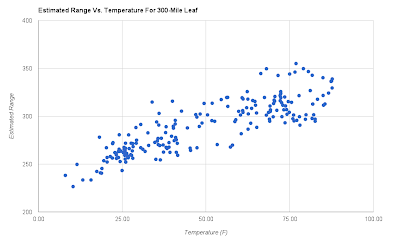
Now that data looks much more correlated to temperature. I removed the first five months of data again for this plot, and I combined all of the rest into one color since comparing the two years isn't useful with the modifications that were done to the data. The regression coefficient on this set of samples is now 0.72, showing much more predictive accuracy versus temperature.
Some may quibble with the fact that it looks like I'm just running the data through a running average, and of course the data will look tighter after I do that. But that is entirely the point. If the Leaf had a 300 mile range instead of 75 miles, the telematics would have many more miles of range and the associated driving conditions to make a good estimate and adjust it. Like so many other issues with EVs, the issues with highly variable range and what appears to be an inaccurate GOM would evaporate with a much bigger range.
A 300-mile Leaf would likely have an even more accurate trip computer than this plot portrays because the data it would be processing would be much less disjointed. (Also, remember that my temperature data could have been taken in a more accurate way.) The current job of the GOM is practically impossible because it's working with only tens of miles between charges, and it's trying to predict the range on a charged battery for as yet unknown driving conditions based primarily on the previous cycle's driving conditions. No wonder it's a Guess-O-Meter. Increasing the range in future EVs will certainly improve the GOM's ability to estimate range.
I'm quite pleased to see that my Leaf's battery has probably only lost 2% of its charge in 18 months. It is also nice to see that the huge variations in range estimation are likely due to the simple fact that the Leaf has a much shorter range than a normal ICE car. What about that other number that the Leaf's telematics display so prominently: the miles/kWh? My Leaf has varied from 4.0 miles/kWh to 5.1 miles/kWh between winter and summer. Does that agree with all of this data?
If I assume that the battery is at a full capacity of 24 kWh in the summer, my range estimate of 80.5 miles equates to 3.4 miles/kWh, which is a far cry from 5.1 miles/kWh. The battery appears to be at about 80% of full capacity, or 19.2 kWh in the winter, so my range estimate of 64.3 miles equates to the same 3.4 miles/kWh. The Leaf must be estimating based on a fixed kWh number, so if we assume it's 24 kWh, that results in 2.7 miles/kWh. The average of 2.7 and 3.4 is 3.05 miles/kWh, which is really close to the EPA's estimate of 2.94 miles/kWh.
Why is the Leaf over-reporting this number? It's possible that it's using a lower value for the usable capacity of the battery and that the battery is more efficient in the 80%-20% range that I have been using it. But if we assume that the Leaf's measurement is accurate, then there would only be 16 kWh of usable energy in the battery. That seems a bit too low. Without knowing more about the battery measurement system design, I'm suspecting that it's a combination of usable capacity, optimal efficiency range, and over-reporting.
I'm not too pleased about that last reason. The miles/kWh is a critical measure of the efficiency of the car, and Leaf owners would benefit much more from an accurate reporting of this measurement for fuel savings calculations than the happy-but-ignorant feeling that comes from an inflated value. I hope that Nissan corrects this measurement in the future, or that the EPA can force more accurate reporting.
Other than that one issue, I'm quite happy with how this analysis has turned out. It appears that I have a healthy battery that will serve me well for many years to come, and the range is more than enough for my daily driving needs, even if it's a little variable. I'm definitely sold on the idea of EVs and believe that they are a solid, reliable alternative to ICE cars in the right circumstances with even more potential in the future.
Next week I'd like to shift from thinking about the past year and a half of Leaf ownership to thinking about the future of EVs.
The Rest of the Leaf Series:
Part 1: The Acquisition
Part 2: The Summer Drive
Part 3: The Winter Drive
Part 4: Frills and Maintenance
Part 5: The Data
Part 6: The Future
Part 7: The Energy Efficiency Meter
Methodology, or How do I Log All of This Data and Stay Sane?
After my nearly-out-of-charge experience driving home from the Rochester dealership to Madison, I figured I wanted to know how the battery would behave in this new electric car over a long period of time and a wide range of driving conditions. I immediately started a mileage log where I recorded the number of miles on the GOM post-charge, the high and low temperature as measured by the car's thermometer during the trips between charges, and the number of miles on the GOM and the odometer right before plugging in. Since my commute to work is slightly more than 11 miles, and I use the Leaf primarily for that commute, most of the trips between charges are either 22 miles in the winter or 45 miles in the summer. In the summer I can safely do two commutes on an 80% charge, but in the winter I don't chance it.
One of the issues with taking the data this way is that the temperatures associated with the driven miles are not very accurate. For each set of trips between charges, I end up with a single high and low temperature. In the summer when I do two commutes on a charge, there can be a lot of variation in temperature between the two commutes, and that is not captured well in the data. If I had it to do over again, I would have recorded a temperature for each trip and calculated a weighted average temperature for each charge cycle. In fact, I've started doing that now, so in a few months I should have some more accurate temperature data to compare to what I already have. As it is, I calculate an average temperature from the high and low temperatures.
The other major issue is that I am fully depending on the car's measurements and representation of the battery charge level. The Leaf's miles-to-empty readout is called a Guess-O-Meter for a reason. It moves around a lot, and in my experience, it is always optimistic - more so in ECO mode. I could have invested in a GID meter that reads the battery's charge level directly off of the Leaf's CANbus, but I didn't do this for two reasons. First, I didn't know about this meter early on, and I didn't want to invalidate the data I had already taken by changing my methodology. Second, I wanted this to be a real-world test of what an average Leaf owner will experience over the long term. The average person is not going to buy a meter and measure their battery everyday. They're going to depend on the Leaf's telematics, so I thought it best to do the same.
Data in the Raw
After entering all of the data into a Google spreadsheet, I did some quick data corrections. On a handful of charges, I charged to 100% instead of 80%, so I scaled the GOM readings for those charges to 80% to make later comparisons easier. Then I took the midpoint of each high and low temperature set to have an average temperature value for each charge cycle. Here's what the post-charge GOM and temperature data looks like as a time series (click to enlarge).

Conveniently, the GOM miles and temperature are on the same scale. Immediately, you can see that there is a correlation between these two series, although it's far from perfect. In a number of places, big changes in temperature do not correspond to big changes in the GOM readout. A couple other observations come out here. One is that the GOM readout changes markedly near the end. That is because of the software upgrade I had done on June 28th, and you can see that it reduced the GOM's optimism somewhat. The second is that 2012 was warmer overall than 2013 so far. The early winter months were milder and warmed up much faster than 2013, and the summer spent much more time over an average temperature of 75℉. That will be significant later on.
One other thing I changed during the data collection was when I drove in ECO mode or D(rive) mode. At first I always drove in ECO mode, but in the end of May this year I switched to D mode on the beltline because I wondered if the regenerative braking was being too aggressive when I was going 55mph. I thought I might get better mileage in D mode, but it turned out to make absolutely no difference and no change is noticeable in the data. I did learn that ECO mode adds a flat 10% to the GOM. That may be a good estimate for city driving, but at constant freeway speeds ECO mode and D mode are basically equivalent unless you're running the climate control. There is no mileage benefit to one or the other so I'm switching back to ECO mode because I like the accelerator behavior more in that mode. For the purposes of this data analysis, everything is converted to ECO mode values to keep calculations consistent.
Estimating the Battery's Capacity from the GOM
There's not much more we can deduce from the raw time series, so let's try putting it into a more useful form. The obvious thing to do is plot the post-charge GOM reading against temperature, so here's a scatter plot of that.

I plotted the data for 2012 and 2013 in different colors so that you can see how they differ. The 2012 data has a lot more samples in the 50-60 degree range and above 80 degrees. The 2013 data has more samples clustered below 30 degrees with a near void in the 50-60 degree range. The data is certainly noisy, but there is a definite correlation between GOM miles and temperature. That trend seems to peak right around 75 degrees and then starts to tail off at hotter temperatures, but at a much slower rate than it does at freezing temperatures. It's a bit hard to draw more conclusions from the higher temperatures because of a lack of samples up there.
What we can do is calculate a regression line to get a linear estimation of the GOM-Temperature relationship. I ran regressions for all of the data and 2012 and 2013 separately, and here is what came out:
All
|
2012
|
2013
| |
slope
|
0.219
|
0.189
|
0.237
|
slope-sigma
|
0.0119
|
0.0154
|
0.0164
|
intercept
|
68.8
|
71.6
|
66.4
|
intercept-sigma
|
0.62
|
0.82
|
0.84
|
r^2
|
0.541
|
0.484
|
0.622
|
The regression coefficient, which is a measure of how closely the data fits the regression line with 1.0 being a perfect fit, is pretty good considering the GOM data is so noisy. It's a bit worse for the 2012 data and a bit better for the 2013 data. To get a better idea of what this data is telling us, we can plot the estimated miles-to-empty value for a given temperature using the slope and intercept values. Let's do that for the 2012 and 2013 regressions between 0 degrees and 75 degrees, and I'll include 3-sigma error lines above and below the main regression lines. I'll also scale the lines so that the 2012 75 degree point represents 100% of full capacity. I stop at 75 degrees because it's unclear from the data what the trend is above that temperature.

Now this is interesting. It looks like the Leaf's battery loses about 15-25% of its capacity in temperatures below 15℉. The 2013 line is probably pulled lower because there is a lot more data at low temperatures for that year, but overall, that agrees with what I was experiencing on the road. It also looks like my battery lost a bit less than 2% of its capacity over 18 months. That seems pretty good to me. If loss continues at that rate, my battery wouldn't go below 70% capacity for more than 20 years, and it would still be useable to me at that point!
I bet charging to 80% and not ever using quick charge stations has helped keep the battery healthy. It's nice to see that taking good care of the battery is having a positive effect. I just hope that the charge loss in years to come stays linear. Of course, with taking into account the error bands, the real capacity loss could be higher or lower than 2%. It would be nice if Nissan would give you a capacity loss value in percent during the annual battery checks, but they only report the number of bars of capacity out of twelve that the Leaf's display already gives you.
How About Calculating Battery Capacity Another Way
Instead of using the Leaf's GOM to estimate battery capacity directly, we can calculate an estimated range for each charge cycle and look at the charge loss between 2012 and 2013 from that data. The range can be estimated by calculating the ratio between the number of miles traveled and the difference in the GOM readings for each charge cycle and multiplying that by the post-charge GOM reading scaled to 100% charge, i.e.
Range = Charged_GOM/0.8 * miles/(Charged_GOM - Post_Trip_GOM)Plotting these ranges against the average temperature for each trip gives us the following scatter plot:

Whoa, that is some noisy data! I plotted the first five months of data in yellow to show that there was even more variation in the beginning. It seems that the Leaf goes through a pretty long learning period of about 2500 miles. Even with those points removed, this data is quite diffuse, and the regression coefficient is only 0.28. Also, the regression lines for the 2012 and 2013 data cross, which doesn't seem right at all. However, if we take the average of all of these ranges, we get 75.5 miles. That is really close to the EPA's estimation of a 73 mile range for the 2012 Leaf, so we're probably on the right track.
One of the problems with using the Leaf's GOM reading to calculate range is that after a charge it is estimating the miles-to-empty using the data from the previous charge cycle to attempt to predict the future. Since we already know the future temperature for each trip that the GOM is trying to predict, we can plug that average temperature into the linear estimation formula to get a better estimate of the starting miles-to-empty for each charge. Then we can plug that number into the equation above for calculating the range. Here is the plot that we get from that exercise:


All
|
2012
|
2013
| |
slope
|
0.237
|
0.215
|
0.222
|
slope-sigma
|
0.0215
|
0.034
|
0.028
|
intercept
|
61.1
|
64.3
|
60.5
|
intercept-sigma
|
1.18
|
2.06
|
1.43
|
r^2
|
0.371
|
0.34
|
0.334
|
The overall regression coefficient improved considerably, and the regression coefficients for the individual years aren't much worse. However, there is considerably more uncertainty in all of the coefficients than there were for the battery capacity estimates. It is still informative to plot the regression lines, but the 3-sigma error lines are much wider.

Note that for the estimated range, the slopes for the two years are almost identical, possibly because the data during the learning period was removed. The range varies from a minimum of about 55 miles in extreme cold to more than 85 miles in pleasantly warm temperatures, or more than 20% variation over this temperature range. The difference in the two lines equates to approximately a 4% loss of range, but with the large error bands, it's quite possible that the real loss would be higher or lower. A 4% loss would still be respectable, and it would take more than 11 years to hit 70% of full range.
I should stress that these linear estimates are just that - estimates. The range values were calculated from a linear estimation, and I have never driven my Leaf from a 100% charge to "turtle" mode, where the car limits the speed to a crawl to conserve charge and protect the battery from completely discharging. Thus, I don't actually know what the real range is at any temperature, let alone over a range of temperatures. What these plots do show quite well is that even if you did drive the Leaf until it's near empty, there's a lot of variation from one charge cycle to the next, and you won't have a good idea of its overall range unless you do a lot of those measurements. Treating the battery that harshly is not recommended, and would accelerate the capacity loss, so I prefer to play with estimation techniques.
We're Not Done Yet
So far we have seen that the GOM data I'm working with is highly variable. I'm going to speculate that the variation is actually due to the comparatively short range of the Leaf, and that if its range was about four times larger, it would be at least as accurate as the mileage estimators on normal ICE cars. To model this assumption, I took the data from the previous plots and summed every five samples of the post-charge GOM, post-trip GOM and trip miles, and I did a five-sample running average of the temperature data that was weighted by the trip miles. If I then run this data through the range estimation equation, I get a set of estimated ranges for a 300-mile range Leaf with the assumption that I'm charging it to 80% and driving it almost to empty.

Now that data looks much more correlated to temperature. I removed the first five months of data again for this plot, and I combined all of the rest into one color since comparing the two years isn't useful with the modifications that were done to the data. The regression coefficient on this set of samples is now 0.72, showing much more predictive accuracy versus temperature.
Some may quibble with the fact that it looks like I'm just running the data through a running average, and of course the data will look tighter after I do that. But that is entirely the point. If the Leaf had a 300 mile range instead of 75 miles, the telematics would have many more miles of range and the associated driving conditions to make a good estimate and adjust it. Like so many other issues with EVs, the issues with highly variable range and what appears to be an inaccurate GOM would evaporate with a much bigger range.
A 300-mile Leaf would likely have an even more accurate trip computer than this plot portrays because the data it would be processing would be much less disjointed. (Also, remember that my temperature data could have been taken in a more accurate way.) The current job of the GOM is practically impossible because it's working with only tens of miles between charges, and it's trying to predict the range on a charged battery for as yet unknown driving conditions based primarily on the previous cycle's driving conditions. No wonder it's a Guess-O-Meter. Increasing the range in future EVs will certainly improve the GOM's ability to estimate range.
And Finally We Come to the Issue of Miles/kWh
I'm quite pleased to see that my Leaf's battery has probably only lost 2% of its charge in 18 months. It is also nice to see that the huge variations in range estimation are likely due to the simple fact that the Leaf has a much shorter range than a normal ICE car. What about that other number that the Leaf's telematics display so prominently: the miles/kWh? My Leaf has varied from 4.0 miles/kWh to 5.1 miles/kWh between winter and summer. Does that agree with all of this data?
If I assume that the battery is at a full capacity of 24 kWh in the summer, my range estimate of 80.5 miles equates to 3.4 miles/kWh, which is a far cry from 5.1 miles/kWh. The battery appears to be at about 80% of full capacity, or 19.2 kWh in the winter, so my range estimate of 64.3 miles equates to the same 3.4 miles/kWh. The Leaf must be estimating based on a fixed kWh number, so if we assume it's 24 kWh, that results in 2.7 miles/kWh. The average of 2.7 and 3.4 is 3.05 miles/kWh, which is really close to the EPA's estimate of 2.94 miles/kWh.
Why is the Leaf over-reporting this number? It's possible that it's using a lower value for the usable capacity of the battery and that the battery is more efficient in the 80%-20% range that I have been using it. But if we assume that the Leaf's measurement is accurate, then there would only be 16 kWh of usable energy in the battery. That seems a bit too low. Without knowing more about the battery measurement system design, I'm suspecting that it's a combination of usable capacity, optimal efficiency range, and over-reporting.
I'm not too pleased about that last reason. The miles/kWh is a critical measure of the efficiency of the car, and Leaf owners would benefit much more from an accurate reporting of this measurement for fuel savings calculations than the happy-but-ignorant feeling that comes from an inflated value. I hope that Nissan corrects this measurement in the future, or that the EPA can force more accurate reporting.
Other than that one issue, I'm quite happy with how this analysis has turned out. It appears that I have a healthy battery that will serve me well for many years to come, and the range is more than enough for my daily driving needs, even if it's a little variable. I'm definitely sold on the idea of EVs and believe that they are a solid, reliable alternative to ICE cars in the right circumstances with even more potential in the future.
Next week I'd like to shift from thinking about the past year and a half of Leaf ownership to thinking about the future of EVs.
The Rest of the Leaf Series:
Part 1: The Acquisition
Part 2: The Summer Drive
Part 3: The Winter Drive
Part 4: Frills and Maintenance
Part 5: The Data
Part 6: The Future
Part 7: The Energy Efficiency Meter
Subscribe to:
Posts (Atom)